EducationSoftwareStrategy.com
StrategyCommunity

Knowledge Base

Product

Community

Knowledge Base

TopicsBrowse ArticlesDeveloper Zone

Product

Download SoftwareProduct DocumentationSecurity Hub

Education

Tutorial VideosSolution GalleryEducation courses

Community

GuidelinesGrandmastersEvents
x_social-icon_white.svglinkedin_social-icon_white.svg
Strategy logoCommunity

© Strategy Inc. All Rights Reserved.

LegalTerms of UsePrivacy Policy
  1. Home
  2. Topics

KB16609: What is the SQL History List within DB Query Tool, and where is it stored in MicroStrategy 9.x and newer?


Community Admin

• Strategy


This KB discusses the SQL History List within DB Query Tool and where it is stored within MicroStrategy.

QUESTION:
What is the SQL History List?
ANSWER:
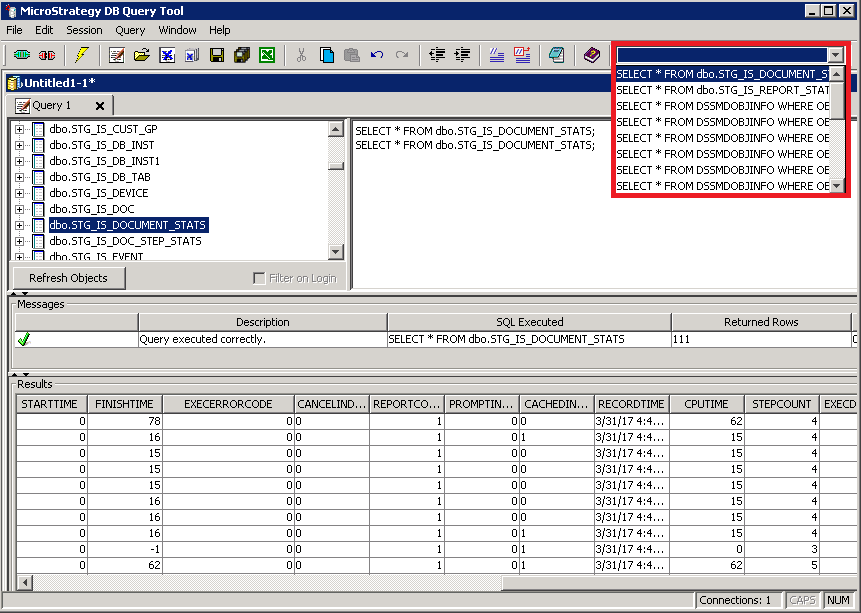
The SQL History List is an often over-looked feature of DB Query Tool. Located in the top right corner of the DB Query Tool interface, it shows the last 20 SQL queries executed by the user, as shown below:
ka04W000000OajQQAS_0EM440000002LFW.png

By selecting a query from the drop-down list, it is automatically inserted into the current window.
QUESTION:
Where is the SQL History List stored?
ANSWER:
These recent SQL queries are stored in a file named 'TestODBCHistory.sql'. This file is located in the following default directory:
C:\Program Files\Common Files\MicroStrategy\TestODBCHistory.sql
QUESTION:
How can the SQL History List be cleared?
ANSWER:
The queries in the SQL History list may be cleared through one of the following two methods:
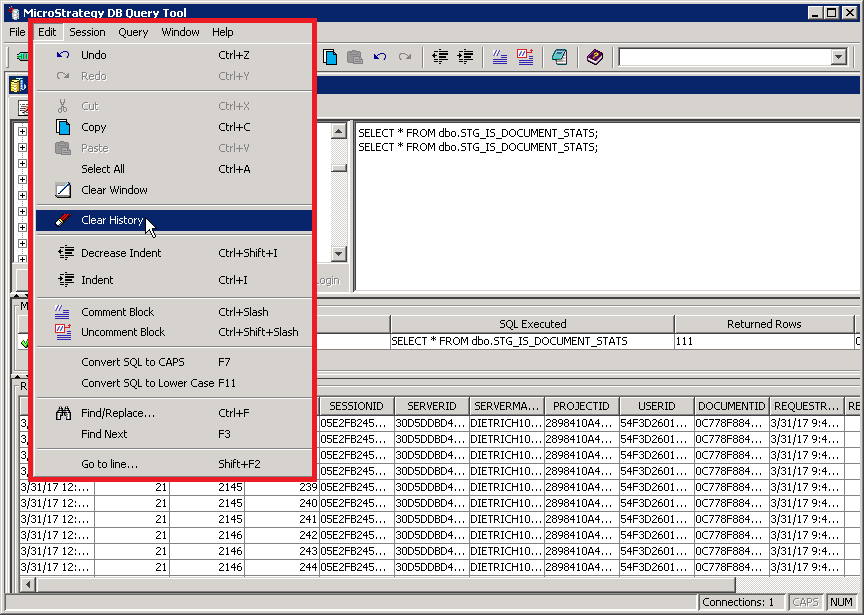
  1. By choosing the Edit menu, 'Clear History.'
ka04W000000OajQQAS_0EM440000002LFb.png

​
KB16609


Comment

0 comments

Details

Knowledge Article

Published:

May 8, 2017

Last Updated:

November 22, 2018