SYMPTOM
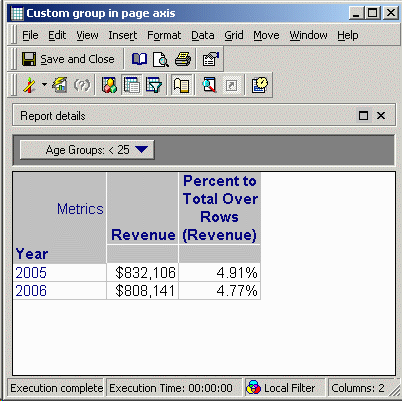
A user constructs a report such as the following. Note that a custom group, 'Age Groups' from the Strategy Tutorial project, is used in the page-by axis. Also, a percent-to-total derived metric has been added to the report using the Insert > Percent to Total > Over Rows menu option, obtained by right-clicking on the metric whose percentage is desired.
When the report is executed, the percentage values for the displayed page are smaller than expected. The values here, 4.91% and 4.77% add up to well below 100%.
CAUSE
The percentages are actually calculated correctly according to the derived metric definition, as shown below:
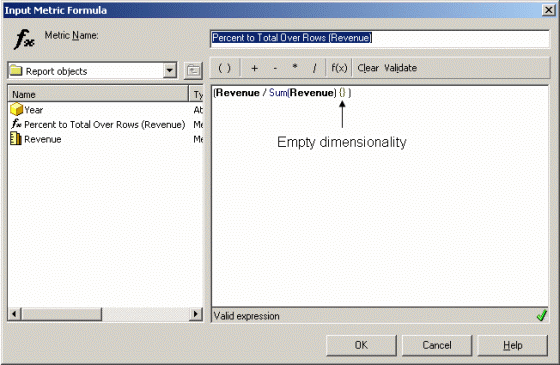
In this formula, the denominator of the percentage has an empty dimensionality. This is because the metric was created using the percent to total over rows command. This command constructs a derived metric whose dimensionality consists of all the attributes that are not in the row axis. This includes the column axis and page axis. Since the column axis is empty in this report, the denominator's dimensionality is empty.
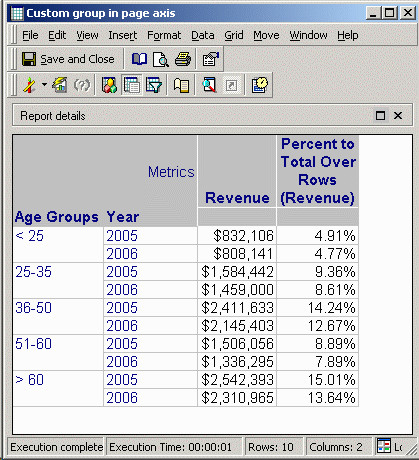
This means that the denominator sum of Revenue will include all of the Revenue values returned by the database, whether or not they are displayed in the current page. In the above report, if the Age Groups custom group is pivoted to the row axis, it becomes clear that the under-25 age group did actually contribute a relatively small percentage of the total across all age groups.
The root cause of the issue is that it is not possible to add a custom group to the dimensionality of an aggregation. Only attributes may be used. For example, if the Category attribute is used in place of the Age Groups custom group and is placed onto the page axis, a 'percent to total over rows' derived metric will have the following formula:
(Revenue / Sum(Revenue) {Category } )
With this definition, the percentage values within one Category element are expected to add up to 100%. As a result, each page would have a 100% total.
When using a custom group, the denominator cannot be broken down per custom group element. Thus, the percentage will always be calculated over the entire data set.
ACTION
This issue is logged with Strategy for review. Contact Strategy Technical Support for an update on the status of the issue.
For some types of custom groups, it may be possible to work around the issue by creating an attribute whose ID is based on a CASE expression. This approach is described in detail in the following Strategy Knowledge Base technical note.
KB9920 (KB5200-7XX-0425): How to workaround the limitations of a Percent to Total derived metric used with custom groups in the Strategy Engine
