Network threads in Strategy Intelligence Server 10.x are responsible for reading the network buffers and depositing the message on an event queue, which is further processed by the application model.
The 'Number of network threads' setting can be found under Configure Strategy Intelligence Server > Server Definition > General, as shown in the image below:
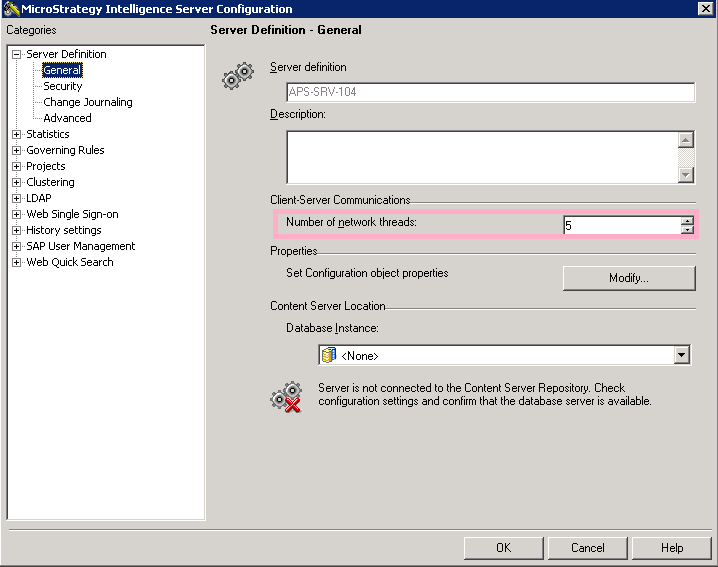
This setting allows users to control the number of network threads that will be created by the Intelligence Server to communicate with Strategy Web, desktop and other clients. For Intelligence Servers running on a Windows platform, the number of network threads restricts the maximum number of TCP/IP connections that the Intelligence Server may be able to keep connected at any given time. Because of the Winsock implementation, each thread can have a maximum of 64 connections open. So the relationship between the number of network threads, and the number of client connections is expressed as follows:
Number of client connections (in this case TCP/IP network connections) = 64 x Number of network threads
The default value for the 'Number of network threads' setting is '5' and this implies that the maximum allowable number of concurrent client connections is 320.
Note: A value of 5 for the 'Number of network threads' setting does not mean that only five clients can connect concurrently, but rather that up to 320 concurrent client connections are possible. Each Strategy Desktop / Command Manager / Object Manager / Enterprise Manager tool will generally open just a single connection to the Intelligence Server. Strategy Web servers will open connections in accordance with the parameters specified in the Web Administrator page. Further, Strategy Web pools user sessions within the network connections. What this means is that a relatively small number of connections from the Web server to the Intelligence Server can sustain a large user session load. The optimal number of Web connections may be determined by performing load testing analysis.
Intelligence Server Universal: Because the network socket layer in Unix/Linux platforms differs from the Windows OS, the number of network threads does not have any significance with relation to the maximum number of connections for the Intelligence Server on these platforms. The maximum number of connections that can be created to the Intelligence Server Universal depends on the underlying file descriptor set size (FD_SETSIZE), since open network sockets are abstracted as file descriptors. For Linux the theoretical maximum number of connections is 1024, for HP-UX 2048 and for AIX and Solaris it is 65535. This is purely theoretical because the files are opened by the Intelligence Server for other activities including inter process communication with the database processes (M8MulPrc_32), which reduces the number of available file descriptors for network communication.
Note: The default optimal value as determined by in-house tests for this setting is 5. Higher values for this setting may affect performance without providing any appreciable benefit. Lower values of this setting may slow or prevent connections to the server, in a high concurrency environment. The optimal value of this setting is environment dependent and may be chosen by trial and error.
