EducationSoftwareStrategy.com
StrategyCommunity

Knowledge Base

Product

Community

Knowledge Base

TopicsBrowse ArticlesDeveloper Zone

Product

Download SoftwareProduct DocumentationSecurity Hub

Education

Tutorial VideosSolution GalleryEducation courses

Community

GuidelinesGrandmastersEvents
x_social-icon_white.svglinkedin_social-icon_white.svg
Strategy logoCommunity

© Strategy Inc. All Rights Reserved.

LegalTerms of UsePrivacy Policy
  1. Home
  2. Topics

KB16631: What are the origin options for drill maps in MicroStrategy Developer 9.x?


Stefan Zepeda

Salesforce Solutions Architect • Strategy


What are the origin options for drill maps in MicroStrategy Developer 9.x?

In Strategy Developer 9.x, users can configure several drill maps for each report. Each drill map will have its own origin.
 
Access the Drill Map Editor
In order to configure the drill map for a specific report, go to the Report Editor and in the Data menu, open the Drill Map Editor by clicking on 'Edit Drill Map', as shown below:
 

ka02R000000kcbjQAA_0EM440000002FAi.gif

 
Origins for Drill Maps in a Report
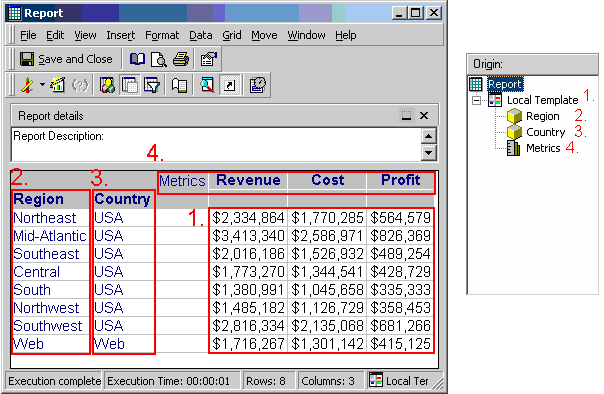
In the Drill Map Editor, users can select different origins for drill maps in a report. The different origins are:
 

  • Local Template - Define the drill map that is accessible by right-clicking on any metric value.
  • Attributes - Users can set up a different drill map for every attribute in the report and is accessible by right-clicking on the attributes description or the attribute name.
  • Metrics - Define the drill map that is accessible by right-clicking on the metric name or in the word 'Metrics' in the grid.

The following image illustrates this. The red rectangles illustrate the area where users can right-click and access that specific drill map.
 

ka02R000000kcbjQAA_0EM440000002FAp.gif


Comment

0 comments

Details

Knowledge Article

Published:

April 11, 2017

Last Updated:

April 11, 2017