SYMPTOM:
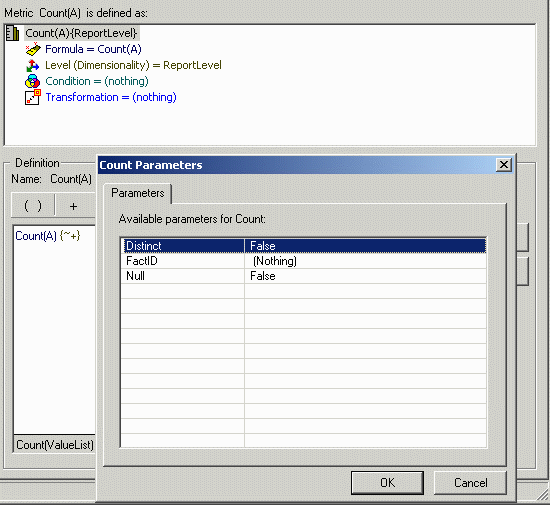
A project exists with a Teradata warehouse. In this project, a user creates a Count metric. The Count function's 'Distinct' parameter is set to false, so that the metric will count all of the rows in the base table, as shown below:
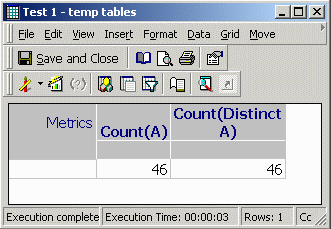
For testing purposes, the attribute A refers to a table 'source,' into which exactly 100 rows have been inserted. Thus, the count metric is expected to return 100. Instead, it produces 46, the same value as a count distinct metric, as shown below:
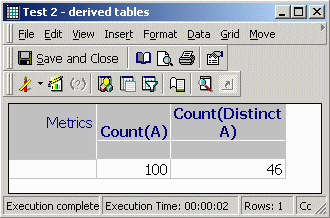
However, if the VLDB property 'Intermediate Table Type' is changed to 'Derived Table' (the default for Teradata), then the metric returns the expected value, as shown below:
1. Perform cross-tabbing] create volatile table ZZDA00, no fallback, no log( WJXBFS1 INTEGER) on commit preserve rows ;insert into ZZDA00 select a11.a_id WJXBFS1 from source a11 create volatile table ZZOT01, no fallback, no log( WJXBFS1 INTEGER) on commit preserve rows ;insert into ZZOT01 select pa11.WJXBFS1 WJXBFS1 from ZZDA00 pa11 where pa11.WJXBFS1 is not null create volatile table ZZMD02, no fallback, no log( WJXBFS1 INTEGER) on commit preserve rows ;insert into ZZMD02 select count(*) WJXBFS1 from ZZOT01 pa11 create volatile table ZZOT03, no fallback, no log( WJXBFS1 INTEGER) on commit preserve rows ;insert into ZZOT03 select distinct pa11.WJXBFS1 WJXBFS1 from ZZDA00 pa11 where pa11.WJXBFS1 is not null create volatile table ZZDT04, no fallback, no log( WJXBFS1 INTEGER) on commit preserve rows ;insert into ZZDT04 select count(*) WJXBFS1 from ZZOT03 pa11 select pa11.WJXBFS1 WJXBFS1, pa12.WJXBFS1 WJXBFS2 from ZZMD02 pa11 cross join ZZDT04 pa12 drop table ZZDA00 drop table ZZOT01 drop table ZZMD02 drop table ZZOT03 drop table ZZDT04 select pa11.WJXBFS1 WJXBFS1, pa12.WJXBFS1 WJXBFS2 from (select count(*) WJXBFS1 from (select pa11.WJXBFS1 WJXBFS1 from (select a11.a_id WJXBFS1 from source a11 ) pa11 where pa11.WJXBFS1 is not null ) pa11 ) pa11 cross join (select count(*) WJXBFS1 from (select distinct pa11.WJXBFS1 WJXBFS1 from (select a11.a_id WJXBFS1 from source a11 ) pa11 where pa11.WJXBFS1 is not null ) pa11 ) pa12 | 1. Perform cross-tabbing] create volatile table ZZDA00, no fallback, no log( WJXBFS1 INTEGER) on commit preserve rows ;insert into ZZDA00 select a11.a_id WJXBFS1 from source a11 create volatile table ZZOT01, no fallback, no log( WJXBFS1 INTEGER) on commit preserve rows ;insert into ZZOT01 select pa11.WJXBFS1 WJXBFS1 from ZZDA00 pa11 where pa11.WJXBFS1 is not null create volatile table ZZMD02, no fallback, no log( WJXBFS1 INTEGER) on commit preserve rows ;insert into ZZMD02 select count(*) WJXBFS1 from ZZOT01 pa11 create volatile table ZZOT03, no fallback, no log( WJXBFS1 INTEGER) on commit preserve rows ;insert into ZZOT03 select distinct pa11.WJXBFS1 WJXBFS1 from ZZDA00 pa11 where pa11.WJXBFS1 is not null create volatile table ZZDT04, no fallback, no log( WJXBFS1 INTEGER) on commit preserve rows ;insert into ZZDT04 select count(*) WJXBFS1 from ZZOT03 pa11 select pa11.WJXBFS1 WJXBFS1, pa12.WJXBFS1 WJXBFS2 from ZZMD02 pa11 cross join ZZDT04 pa12 drop table ZZDA00 drop table ZZOT01 drop table ZZMD02 drop table ZZOT03 drop table ZZDT04 select pa11.WJXBFS1 WJXBFS1, pa12.WJXBFS1 WJXBFS2 from (select count(*) WJXBFS1 from (select pa11.WJXBFS1 WJXBFS1 from (select a11.a_id WJXBFS1 from source a11 ) pa11 where pa11.WJXBFS1 is not null ) pa11 ) pa11 cross join (select count(*) WJXBFS1 from (select distinct pa11.WJXBFS1 WJXBFS1 from (select a11.a_id WJXBFS1 from source a11 ) pa11 where pa11.WJXBFS1 is not null ) pa11 ) pa12 |
1. Perform cross-tabbing] create volatile table ZZDA00, no fallback, no log( WJXBFS1 INTEGER) on commit preserve rows ;insert into ZZDA00 select a11.a_id WJXBFS1 from source a11 create volatile table ZZOT01, no fallback, no log( WJXBFS1 INTEGER) on commit preserve rows ;insert into ZZOT01 select pa11.WJXBFS1 WJXBFS1 from ZZDA00 pa11 where pa11.WJXBFS1 is not null create volatile table ZZMD02, no fallback, no log( WJXBFS1 INTEGER) on commit preserve rows ;insert into ZZMD02 select count(*) WJXBFS1 from ZZOT01 pa11 create volatile table ZZOT03, no fallback, no log( WJXBFS1 INTEGER) on commit preserve rows ;insert into ZZOT03 select distinct pa11.WJXBFS1 WJXBFS1 from ZZDA00 pa11 where pa11.WJXBFS1 is not null create volatile table ZZDT04, no fallback, no log( WJXBFS1 INTEGER) on commit preserve rows ;insert into ZZDT04 select count(*) WJXBFS1 from ZZOT03 pa11 select pa11.WJXBFS1 WJXBFS1, pa12.WJXBFS1 WJXBFS2 from ZZMD02 pa11 cross join ZZDT04 pa12 drop table ZZDA00 drop table ZZOT01 drop table ZZMD02 drop table ZZOT03 drop table ZZDT04 select pa11.WJXBFS1 WJXBFS1, pa12.WJXBFS1 WJXBFS2 from (select count(*) WJXBFS1 from (select pa11.WJXBFS1 WJXBFS1 from (select a11.a_id WJXBFS1 from source a11 ) pa11 where pa11.WJXBFS1 is not null ) pa11 ) pa11 cross join (select count(*) WJXBFS1 from (select distinct pa11.WJXBFS1 WJXBFS1 from (select a11.a_id WJXBFS1 from source a11 ) pa11 where pa11.WJXBFS1 is not null ) pa11 ) pa12 | 1. Perform cross-tabbing] create volatile table ZZDA00, no fallback, no log( WJXBFS1 INTEGER) on commit preserve rows ;insert into ZZDA00 select a11.a_id WJXBFS1 from source a11 create volatile table ZZOT01, no fallback, no log( WJXBFS1 INTEGER) on commit preserve rows ;insert into ZZOT01 select pa11.WJXBFS1 WJXBFS1 from ZZDA00 pa11 where pa11.WJXBFS1 is not null create volatile table ZZMD02, no fallback, no log( WJXBFS1 INTEGER) on commit preserve rows ;insert into ZZMD02 select count(*) WJXBFS1 from ZZOT01 pa11 create volatile table ZZOT03, no fallback, no log( WJXBFS1 INTEGER) on commit preserve rows ;insert into ZZOT03 select distinct pa11.WJXBFS1 WJXBFS1 from ZZDA00 pa11 where pa11.WJXBFS1 is not null create volatile table ZZDT04, no fallback, no log( WJXBFS1 INTEGER) on commit preserve rows ;insert into ZZDT04 select count(*) WJXBFS1 from ZZOT03 pa11 select pa11.WJXBFS1 WJXBFS1, pa12.WJXBFS1 WJXBFS2 from ZZMD02 pa11 cross join ZZDT04 pa12 drop table ZZDA00 drop table ZZOT01 drop table ZZMD02 drop table ZZOT03 drop table ZZDT04 select pa11.WJXBFS1 WJXBFS1, pa12.WJXBFS1 WJXBFS2 from (select count(*) WJXBFS1 from (select pa11.WJXBFS1 WJXBFS1 from (select a11.a_id WJXBFS1 from source a11 ) pa11 where pa11.WJXBFS1 is not null ) pa11 ) pa11 cross join (select count(*) WJXBFS1 from (select distinct pa11.WJXBFS1 WJXBFS1 from (select a11.a_id WJXBFS1 from source a11 ) pa11 where pa11.WJXBFS1 is not null ) pa11 ) pa12 |
Note: To produce this result, the database-instance-level VLDB property 'Count(Column) Support' has been set to 'Use Count(*),' instead of the default setting 'Use Count(Column).' This forces the Strategy SQL Generation Engine to use an intermediate result set to evaluate the Count function.
With the default 'Use Count(Column),' the SQL is much simpler and returns the correct result.
select count(a11.a_id) WJXBFS1,
   count(distinct a11.a_id) WJXBFS2
from source a11
If any of these conditions is not met, then the issue should not occur.
ACTION:
The issue may be resolved in one of the following ways. It is not necessary to use both methods simultaneously.
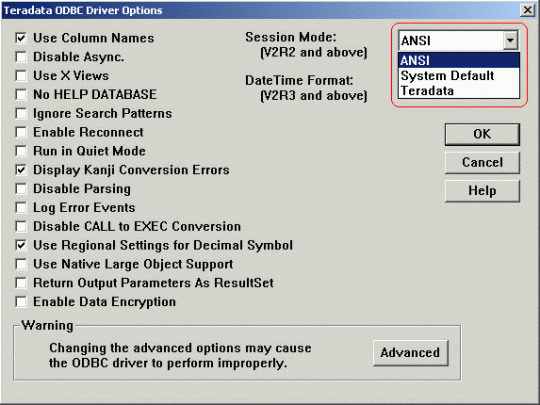
SessionMode=ANSI
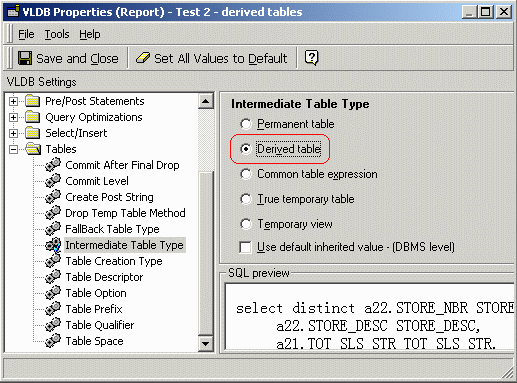
Note that the default intermediate table type for Teradata is 'Derived Table,' so this issue should not occur unless the default has been changed.
Note: This issue is not specific to either Strategy or Teradata versions. Under the above-listed conditions, the Strategy SQL Generation Engine will produce SQL of the above form in all current Strategy versions. The behavior for Teradata-mode connections is consistent across multiple Teradata versions as well.
Note: For more information regarding derived and volatile tables, refer to the following Strategy Knowledge Base technical notes:
