EducationSoftwareStrategy.com
StrategyCommunity

Knowledge Base

Product

Community

Knowledge Base

TopicsBrowse ArticlesDeveloper Zone

Product

Download SoftwareProduct DocumentationSecurity Hub

Education

Tutorial VideosSolution GalleryEducation courses

Community

GuidelinesGrandmastersEvents
x_social-icon_white.svglinkedin_social-icon_white.svg
Strategy logoCommunity

© Strategy Inc. All Rights Reserved.

LegalTerms of UsePrivacy Policy
  1. Home
  2. Topics

KB16663: Denied All ACLs for a function are not being applied in MicroStrategy Developer 8.1.x - 9..x - 10.x.


Stefan Zepeda

Salesforce Solutions Architect • Strategy


When setting the ACL on a function to deny a user access to that function, the ACL is not applied properly in MicroStrategy Developer 8.1.x - 9..x - 10.x. The user still has limited access to the function. The steps below demonstrate the different levels of access to the function a user has.

SYMPTOM:
When setting the ACL on a function to deny a user access to that function, the ACL is not applied properly in Strategy Developer  8.1.x - 9..x - 10.x. The user still has limited access to the function. The steps below demonstrate the different levels of access to the function a user has.
 
STEPS TO REPRODUCE:
There are three different scenarios to reproduce in Strategy Tutorial, each having a different error or problem:
 
Attribute Filter Object
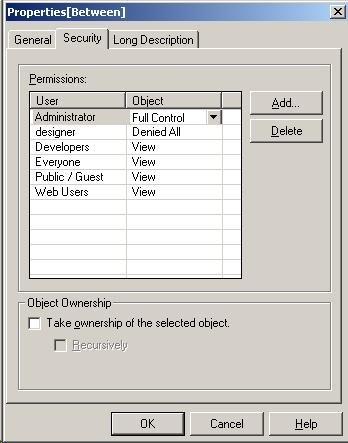
  • Set the ACL on the Between function to Denied All for a user (Schema Objects\Functions and Operators\Operators\Comparison Operators), as shown below:
ka02R000000kcI9QAI_0EM440000002EzC.jpeg
  • The Between function is no longer listed, as shown below:
ka02R000000kcI9QAI_0EM440000002Ez3.jpeg
  • Create a attribute filter, qualify on ID, operator `Between`.
  • Save the filter.
ka02R000000kcI9QAI_0EM440000002Eyw.jpeg
  •  
    The user does not have Use access to this Function object (ID is `xxxx`).
  • This error is expected, however the user should not be able to choose the function in the filter editor.
     

Local Report Filter

  • Set ACL on the Between function to denied all for a user (Schema Objects\Functions and Operators\Operators\Comparison Operators).
  • The Between function is no longer listed.
  • Create report with Country and Revenue.
  • Report Filter > attribute filter, qualify on ID, operator `Between`.
  • Execute the report, as shown below:
ka02R000000kcI9QAI_0EM440000002EzA.jpeg
  •  
    Filter is applied - (Country (ID) Between 1 and 5), as shown below:
     
ka02R000000kcI9QAI_0EM440000002Ez6.jpeg
  •  
    When going back to design mode:
     
    Error reading the qualification: You do not have enough permissions for this object and the qualification can not be displayed. Please ask your administrator to grant you access to see its definition.
  • This error is expected, however the report should not use the function during the initial execution or allow the user to select the function in the filter editor.
     

Report View Filter

  • Set ACL on the Between function to denied all for a user (Schema Objects\Functions and Operators\Operators\Comparison Operators).
  • The Between function is no longer listed.
  • Create report with Country and Revenue.
  • Execute the report.
  • Report View Filter > attribute filter, qualify on ID, operator `Between`, as shown below:
ka02R000000kcI9QAI_0EM440000002Ez8.jpeg
  •  
    Filter is applied - (Country (ID) Between 1 and 2). The between function should not have been used, since the user does not have permission to use the function. So the report should have brought back all of the data or returned an error.
     

CAUSE:
The ACL set for the Between function is not being applied properly. This is a known issue with Strategy Developer  8.1.x - 9..x - 10.x.
 
ACTION:
Contact Strategy Technical Support for an update on the status of this issue.


Comment

0 comments

Details

Knowledge Article

Published:

May 15, 2017

Last Updated:

May 15, 2017