EducationSoftwareStrategy.com
StrategyCommunity

Knowledge Base

Product

Community

Knowledge Base

TopicsBrowse ArticlesDeveloper Zone

Product

Download SoftwareProduct DocumentationSecurity Hub

Education

Tutorial VideosSolution GalleryEducation courses

Community

GuidelinesGrandmastersEvents
x_social-icon_white.svglinkedin_social-icon_white.svg
Strategy logoCommunity

© Strategy Inc. All Rights Reserved.

LegalTerms of UsePrivacy Policy
  1. Home
  2. Topics

KB16665: Sorting specified in a Freeform SQL report is not being applied in MicroStrategy Developer 9.x and 10.x


Stefan Zepeda

Salesforce Solutions Architect • Strategy


This article describes an expected behavior when the sorting is not applied when executing the report in MicroStrategy Developer

SYMPTOM:
When specifying the sorting in the SQL used in a Freeform SQL report, the sorting is not applied when executing the report in Strategy Developer.
 
STEPS TO REPRODUCE:
Follow the steps below to reproduce this issue:
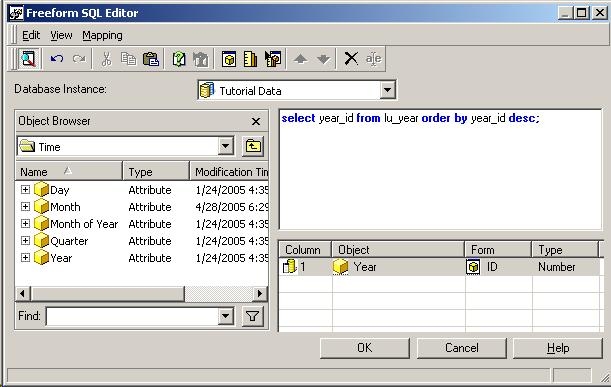
 

  • Create a Freeform SQL report with the following SQL:
    select year_id from lu_year order by year_id desc;
ka02R000000kbijQAA_0EM440000002FAz.jpeg
  • Run the report in Strategy Developer, as shown below:
ka02R000000kbijQAA_0EM440000002FB1.jpeg
  •  
    Notice that Years are returned in ascending order.
     

CAUSE:
This behavior is working as designed. The Strategy Analytical Engine performs sorting per the report or project default settings on all data returned by the database for either regular or freeform SQL reports. This will override any sorting done in the SQL expression itself. There is an enhancement to support maintaining the original data sort in Strategy.
 
ACTION:
Contact Strategy Technical Support for an update on the status of this issue.
 
WORKAROUND:
The workaround is to use the report level sorting settings to apply the needed sorting to the report.


Comment

0 comments

Details

Knowledge Article

Published:

June 9, 2017

Last Updated:

June 9, 2017