It is possible to pass a specific attribute element to a new prompt from one document to another document using URL API in Strategy Web in Strategy 9.X
In the image below, the Customer State 'Connecticut' was generated using a dynamic-text field:
{[Customer State]}
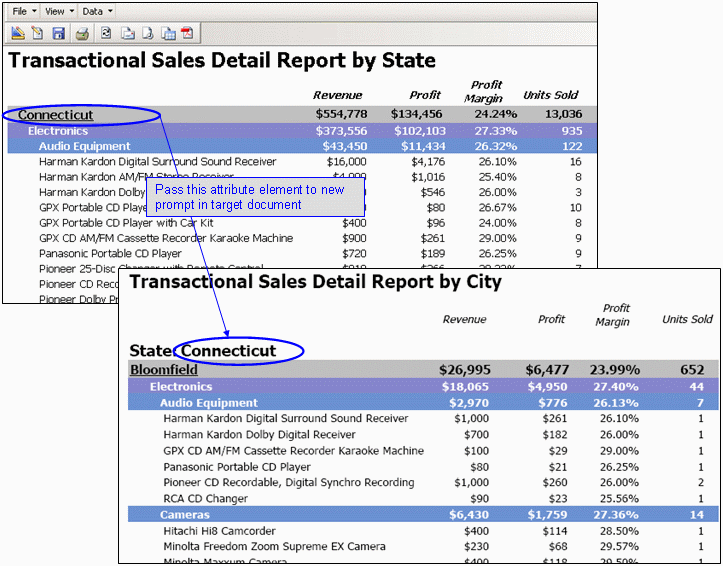
This text field, if placed in the detail section will expand to every element of the Customer State attribute. If placed inside a panel stack and targeted by a selector, it will do the same. The following is the hyperlink property defined depending on the environment:
.NET environment
http://WebServer/MicroStrategy/asp/Main.aspx?evt=2048001&src=Main.aspx.2048001&documentID=B9
800BBC42B65FD064717BB94AF0B44B&viewMode=2&elementsPromptAnswers={&[Customer State]@G
UID};{&[Customer State]@ElementID}
http://WebServer/MicroStrategy/servlet/mstrWeb?evt=2048001&src=mstrWeb.2048001&documentID=B98
00BBC42B65FD064717BB94AF0B44B&viewMode=2&elementsPromptAnswers={&[Customer State]@GU
ID};{&[Customer State]@ElementID}http://WebServer/MicroStrategy/asp/Main.aspx http://WebServer/MicroStrategy/servlet/mstrWeb
evt=2048001
src=Main.aspx.2048001
src=mstrWeb.2048001
viewMode=2
elementsPromptAnswers={&[Customer State]@GUID};{&[Customer State]@ElementIDCode Customization WARNING:
This customization is provided as a convenience to Strategy users and is only directly applicable to the version stated. While this code may apply to other releases directly, Strategy Technical Support makes no guarantees that the code provided will apply to any future or previous builds. In the event of a code change in future builds, Strategy Technical Support makes no guarantee that an updated version of this particular customization will be provided. In the event of a code change in future builds, Strategy may not be able to provide additional code on this matter even though this customization is provided at this time for this specific build. For enhancements to this customization or to incorporate similar functionality into other versions, contact your Account Executive to inquire about Strategy Consulting assistance.
16698
