EducationSoftwareStrategy.com
StrategyCommunity

Knowledge Base

Product

Community

Knowledge Base

TopicsBrowse ArticlesDeveloper Zone

Product

Download SoftwareProduct DocumentationSecurity Hub

Education

Tutorial VideosSolution GalleryEducation courses

Community

GuidelinesGrandmastersEvents
x_social-icon_white.svglinkedin_social-icon_white.svg
Strategy logoCommunity

© Strategy Inc. All Rights Reserved.

LegalTerms of UsePrivacy Policy
  1. Home
  2. Topics

KB16749: What is MicroStrategy Integrity Manager?


Stefan Zepeda

Salesforce Solutions Architect • Strategy


This knowledge base article explains what the MicroStrategy Integrity Manager tool is used for.

Strategy Integrity Manager is an automated report comparison tool designed to streamline the testing of Strategy projects. This tool was introduced in Strategy 8.1.1 and it can determine how a given change in a project environment, such as regular maintenance changes to metadata objects or hardware or software upgrades, affects the reports in that project.
 
For instance, a user may want to ensure that the changes involved in moving a project from a development environment into production do not alter any of the reports. Strategy Integrity Manager can compare reports in the development and the production projects, and highlight any differences. This can assist users in tracking down functional discrepancies between the two projects.
 
Strategy Integrity Manager can also execute reports from a single Strategy project to confirm they remain operational after changes to the system. Strategy Integrity Manager can execute any or all reports from the project, note whether or not they execute, and show the results of each report.
 
Strategy Integrity Manager can perform the following types of comparisons:
 

  • SQL Comparison: Compare report SQL between two projects or a project and a baseline.
  • Data Comparison: Compare report data cell-by-cell between two projects or a project and a baseline.
  • Graph Comparison: Compare report graphs pixel-by-pixel between two projects or a project and a baseline
  • Excel Comparison: Compare the report as exported to Microsoft Excel.
  • PDF Comparison: Compare the report as exported to PDF.

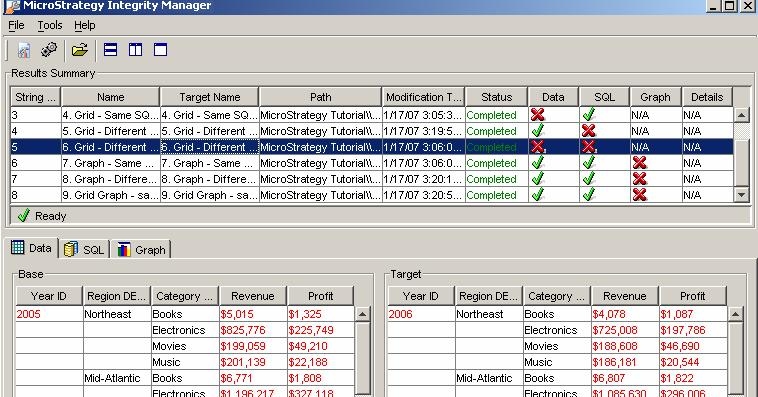
The results of the comparisons are presented to the users in a user friendly interface that will highlight the differences, if any, of the reports that were tested, as shown below:
 

ka02R000000kaIXQAY_0EM440000002FAP.jpeg

 
Considerations for using Strategy Integrity Manager:
 

  • Strategy Integrity Manager can only test three-tier projects, that is, projects that are attached to a Strategy Intelligence Server. Projects in Direct Connection (two-tier) mode cannot be tested with this tool.
  • To execute an integrity test on a project, users must have the 'Use Integrity Manager' privilege for that project. For information on user privileges, see the Strategy System Administration Guide.
  • Strategy Integrity Manager can only connect to Strategy Intelligence Servers with version equal to or lower than the version of Strategy Integrity Manager itself.
  • Differences in report data, SQL, and graph level are displayed in a graphical interface and are saved in HTML files.

For more information about Strategy Integrity Manager, refer to the Help menu inside the application.


Comment

0 comments

Details

Knowledge Article

Published:

May 11, 2017

Last Updated:

May 11, 2017