EducationSoftwareStrategy.com
StrategyCommunity

Knowledge Base

Product

Community

Knowledge Base

TopicsBrowse ArticlesDeveloper Zone

Product

Download SoftwareProduct DocumentationSecurity Hub

Education

Tutorial VideosSolution GalleryEducation courses

Community

GuidelinesGrandmastersEvents
x_social-icon_white.svglinkedin_social-icon_white.svg
Strategy logoCommunity

© Strategy Inc. All Rights Reserved.

LegalTerms of UsePrivacy Policy
  1. Home
  2. Topics

KB16763: How to ensure that all Narrowcast Administrators have the required DCOM permissions when adding user accounts in MicroStrategy Narrowcast Server 9.x


Community Admin

• Strategy


When using MicroStrategy Narrowcast Server 9.x Administrator, it is necessary that the Windows NT users added into Narrowcast Administrator have the proper DCOM permissions on all of the machines in the MicroStrategy Narrowcast Server 9.x system. To achieve this, follow the steps in this knowledge base article.

When using Strategy Narrowcast Server 9.x - 10.x Administrator, it is necessary that the Windows NT users added into Narrowcast Administrator have the proper DCOM permissions on all of the machines in the Strategy Narrowcast Server 9.x - 10.x system. To achieve this, follow the steps below on each machine:
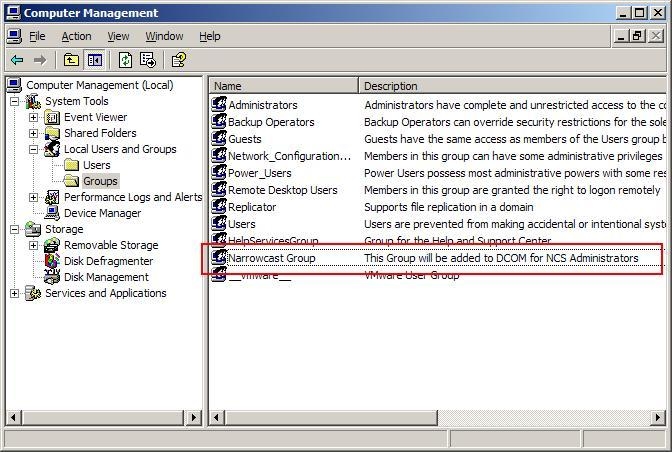
 

  • Create a Windows group in the Computer Management Console and make sure the privleges match the users that will be in the group, as shown below:
ka04W000000Ocb5QAC_0EM440000002BSr.jpeg
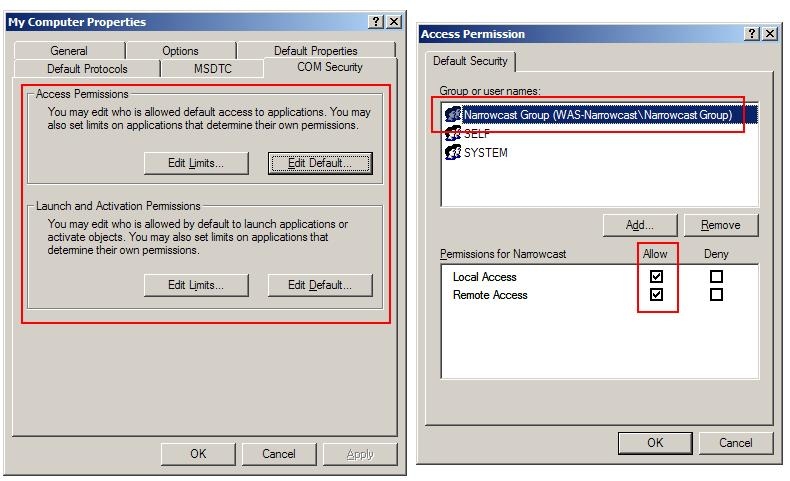
  • Add this group to the default Launch and Activate and Access Permissions and grant all privileges to the group. If using Windows 2003 SP1, make sure to adjust the Edit Limits section of the Default Launch and Activate and Access as described in the following Strategy Knowledge Base technical note:
     
     
    KB16332: When the Primary Distribution Manager fails, the Backup Distribution Manager triggers all Narrowcast Services in Strategy Narrowcast Server 8.x cluster when one Distribution Manager is running Microsoft Windows Server 2003 Service Pack 1

ka04W000000Ocb5QAC_0EM440000002BSv.jpeg
  • Adjust the MCProxy and MCDMProxy service as described in the following Strategy Knowledge Base technical note:

    KB15752: How to ensure DCOM permissions are added for all users in the Strategy Narrowcast Server Administrator 8.1.x
     
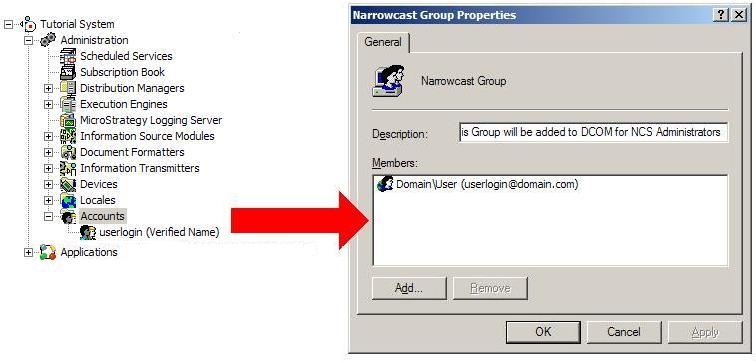
  • When adding users to the Strategy Narrowcast Server 9.x Administrator accounts, be sure to also add the user to the Windows group created in step 1, and start Strategy Narrowcast Server 9.x:

ka04W000000Ocb5QAC_0EM440000002BSu.jpeg

 
Once started, the Strategy Narrowcast Server 9.x - 10.x Administrator accounts will have the correct DCOM Permissions on each machine in the Strategy Narrowcast Server 9.x - 10.x system.


Comment

0 comments

Details

Knowledge Article

Published:

May 2, 2017

Last Updated:

May 2, 2017