SYMPTOM:
When loading or reading the Warehouse Catalog, whether from an existing project or when creating a new project, the following error occurs:

An error was detected while trying to read the warehouse catalog:
The warehouse catalog SQL contains a template string '#?DATABASE_NAME?#' that must be completed before catalog updates can be run.
Do you want to modify the Warehouse Catalog Browser options to try solve this problem?
Please re-run the Warehouse Catalog Browser after you make your changes.
Attempting a manual read of the Warehouse Catalog results in the following error:

Unexpected Error.
The warehouse catalog SQL contains a template string '#?DATABASE_NAME?#' that must be completed before catalog updates can be run.
Attempting to add a table to the schema results in the following error:

Error adding Table(s) to the schema.
The warehouse catalog SQL contains a template string '#?DATABASE_NAME?#' that must be completed before catalog updates can be run.
CAUSE:
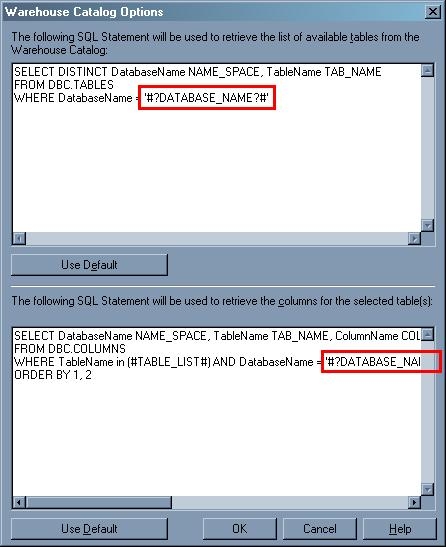
This is a known issue with the Strategy Warehouse Catalog 8.x. The issue is caused by the placeholder '#?DATABASE_NAME?#' found in one or both of the SQL statements for the 'Catalog - Read Settings'.
The first two errors listed in the Technical Document are caused by the appearance of '#?DATABASE_NAME?#' in the first of the 'Catalog -Read Settings' SQL statements which is used to retrieve the list of available tables from the Warehouse Catalog:
SELECT DISTINCT DatabaseName NAME_SPACE, TableName TAB_NAME
FROM DBC.TABLES
WHERE DatabaseName = '#?DATABASE_NAME?#'
The third error is caused by the appearance of '#?DATABASE_NAME?#' in the second of the 'Catalog -Read Settings' SQL statements used to retrieve the columns for the selected table(s):
SELECT DatabaseName NAME_SPACE, TableName TAB_NAME, ColumnName COL_NAME, ColumnType DATA_TYPE, ColumnLength DATA_LEN, DecimalTotalDigits DATA_PREC, DecimalFractionalDigits DATA_SCALE
FROM DBC.COLUMNS
WHERE TableName in (#TABLE_LIST#) AND DatabaseName = '#?DATABASE_NAME?#'
ORDER BY 1, 2
ACTION:
Contact Strategy Technical Support for the latest update on this issue.
WORKAROUND:
To workaround the issue manually replace the placeholder, '#?DATABASE_NAME?#', with the actual database name containing the warehouse data.