EducationSoftwareStrategy.com
StrategyCommunity

Knowledge Base

Product

Community

Knowledge Base

TopicsBrowse ArticlesDeveloper Zone

Product

Download SoftwareProduct DocumentationSecurity Hub

Education

Tutorial VideosSolution GalleryEducation courses

Community

GuidelinesGrandmastersEvents
x_social-icon_white.svglinkedin_social-icon_white.svg
Strategy logoCommunity

© Strategy Inc. All Rights Reserved.

LegalTerms of UsePrivacy Policy
  1. Home
  2. Topics

KB16805: When printing a Report Services document in PDF, Adobe is not inheriting the paper size from the generated Report Services document in MicroStrategy Developer and Web


Stefan Zepeda

Salesforce Solutions Architect • Strategy


When printing a Report Services document in PDF, Adobe is not inheriting the paper size from the generated Report Services document in MicroStrategy Desktop and Web 8.x

SYMPTOM:
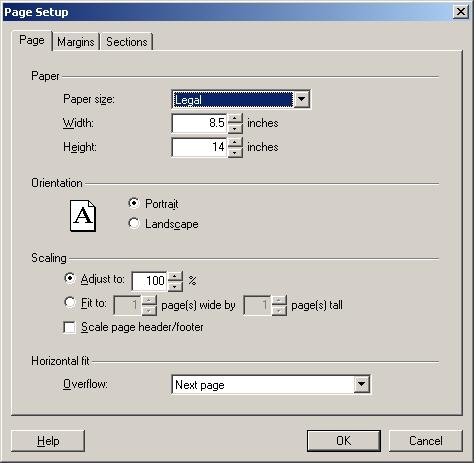
A developer has created a Report Services document and has defined the paper size as Legal, as shown below:
 

ka02R000000kXcUQAU_0EM4400000028iZ.jpeg

 
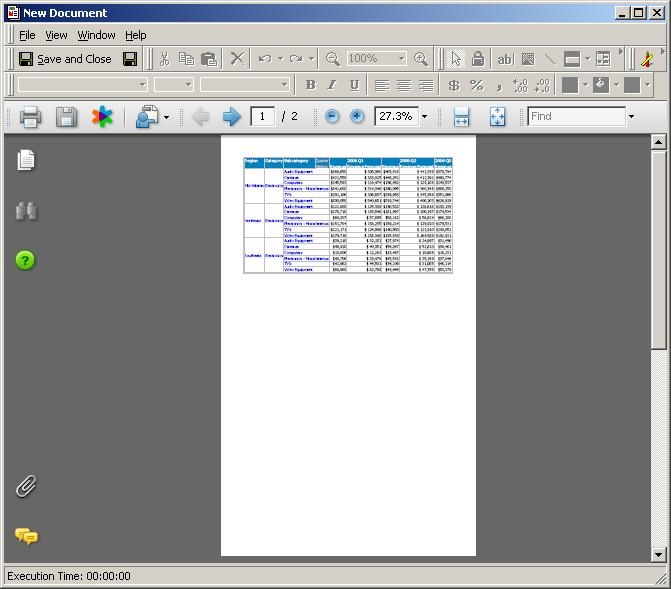
After executing the Report Services document, the developer can see that the paper size is still correct, as shown below:
 

ka02R000000kXcUQAU_0EM4400000028iY.jpeg

 
However, when going to print the document, the paper size is inheriting Letter, as shown below:
 

ka02R000000kXcUQAU_0EM4400000028iW.jpeg

 
CAUSE:
Users need to check the option 'Choose paper Source by PDF page size' to have Adobe inherit the paper size to print from the document, as displayed below:
 

ka02R000000kXcUQAU_0EM4400000028iX.jpeg


Comment

0 comments

Details

Knowledge Article

Published:

June 14, 2017

Last Updated:

June 14, 2017