EducationSoftwareStrategy.com
StrategyCommunity

Knowledge Base

Product

Community

Knowledge Base

TopicsBrowse ArticlesDeveloper Zone

Product

Download SoftwareProduct DocumentationSecurity Hub

Education

Tutorial VideosSolution GalleryEducation courses

Community

GuidelinesGrandmastersEvents
x_social-icon_white.svglinkedin_social-icon_white.svg
Strategy logoCommunity

© Strategy Inc. All Rights Reserved.

LegalTerms of UsePrivacy Policy
  1. Home
  2. Topics

KB16807: Report level VLDB Cartesian Join Warning setting is ignored by Subscription Information Object Report that contains a cross join in MicroStrategy Narrowcast 9.x - 10.x


Community Admin

• Strategy


This article describes a possible cause for the error "Report execution failed for segment job, QueryEngine encountered error: The report contains a cross join in pass 1 between tables xxx and xxx. Execution is aborted per the cartesian join setting."

SYMPTOM:
Dynamic Subscription Service fails during Segmentation due to a Cartesian Join within the Subscription Information Object. When the Database Instance level setting is 'If only one side of a Cartesian Join contains warehouse tables SQL will be executed without warning' and the report level setting is 'Execute', then the report will fail as a subscription information object if it contains a cross join.
 
The following message will appear in the DELogs:


Information source got result for with error: Report execution failed for segment job, QueryEngine encountered error: The report contains a cross join in pass 1 between tables NCS_SUBS and LU_CATEGORY. Execution is aborted per the cartesian join setting.

 
While the System Message Viewer displays:

Service ID Execution ID Segment ID [] Segmentation failed
 
STEPS TO REPRODUCE:

  • Create a Strategy Narrowcast Dynamic Subscription report that contains a cross join.
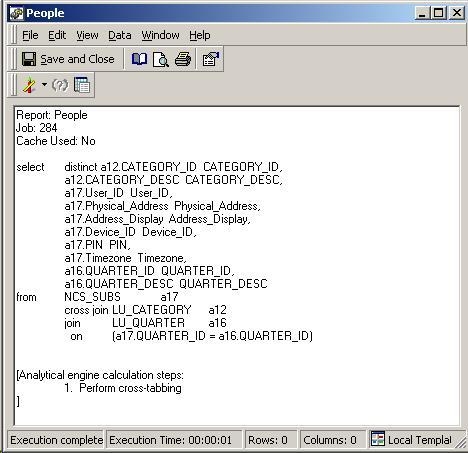
  • Confirm that the SQL includes a cross join by viewing SQL in Developer of the Report:
ka04W000000OhkRQAS_0EM440000002BRU.jpeg
  • Change the Database Instance VLDB properties for Cartesian Join Warning to: 'If only one side of a Cartesian Join contains warehouse tables SQL will be executed without warning'
  • Restart the Strategy Intelligence Server.
  • Change the Report Level VLDB Setting for the Subscription Report to 'Execute'.
  • In Strategy Narrowcast, create a new Subscription Information object referencing the report created above.
  • Running the Service in Narrowcast errors, while running the report in Developer finishes successfully.

 
CAUSE:
This is an identified defect in Strategy Narrowcast 9.x - 10.x.
 
ACTION:
Currently a fix for this issue is not scoped for any upcoming scheduled Strategy release.
 
WORKAROUND:
Changing the VLDB property at the Database Instance level to 'Execute' will prevent the Subscription Information Object from failing. This will affect other reports that are using the setting specified at the Database Instance level. Already existing reports that the Cartesian Warn setting needs to be enabled on would have to be respecified at the report level VLDB setting. To use the original setting in future reports, the setting can also be changed on the Blank Template or other templates so that when a new report is created using that template, it is already applied.


Comment

0 comments

Details

Knowledge Article

Published:

April 17, 2017

Last Updated:

April 17, 2017