SYMPTOM:
When examining an export from Strategy Web users may notice that a hidden chart is included in the export.
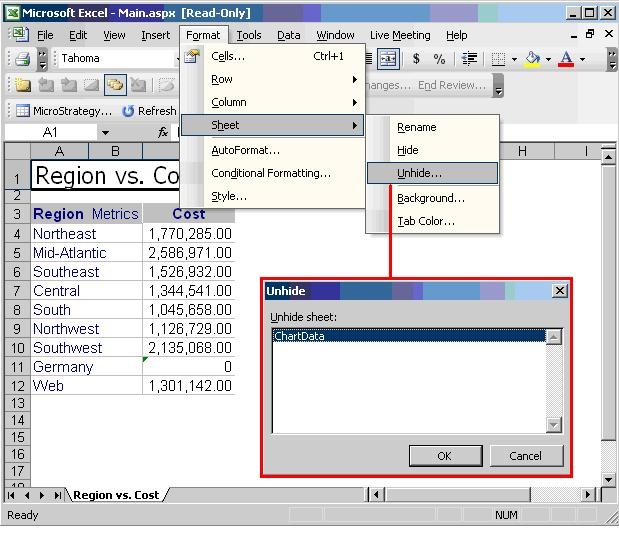
To view the hidden chart, choose Format > Sheet > Unhide, and choose to unhide the ChartData sheet, as shown below:
This hidden ChartData sheet is used to maintain the report data when the option 'Export graphs as Live Excel charts' is enabled, as shown below:

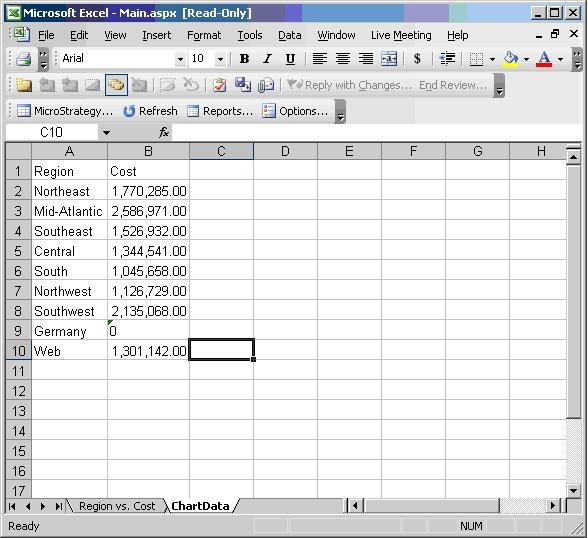
With this setting enabled, Strategy Web stores a copy of the data in the hidden sheet to allow Microsoft Excel to generate a live chart from it, as shown below:
Without this setting enabled, the hidden sheet is empty and has no impact on file size or rendering times.
Note: The 'Export Graphs as Live Excel Charts' setting, along with the ChartData hidden sheet, is only available if the Microsoft Excel version in Project Defaults is set to Excel XP, 2003, and newer, as shown below:

