EducationSoftwareStrategy.com
StrategyCommunity

Knowledge Base

Product

Community

Knowledge Base

TopicsBrowse ArticlesDeveloper Zone

Product

Download SoftwareProduct DocumentationSecurity Hub

Education

Tutorial VideosSolution GalleryEducation courses

Community

GuidelinesGrandmastersEvents
x_social-icon_white.svglinkedin_social-icon_white.svg
Strategy logoCommunity

© Strategy Inc. All Rights Reserved.

LegalTerms of UsePrivacy Policy
  1. Home
  2. Topics

KB16838: User receives the error 'Schema loading error: Population Exception: DBMS-DBMSThe object definition is incomplete or inconsistent' when trying to run a report in MicroStrategy Developer and Web


Stefan Zepeda

Salesforce Solutions Architect • Strategy


User receives a schema loading error when running a report in MicroStrategy Developer or Web.

SYMPTOM:
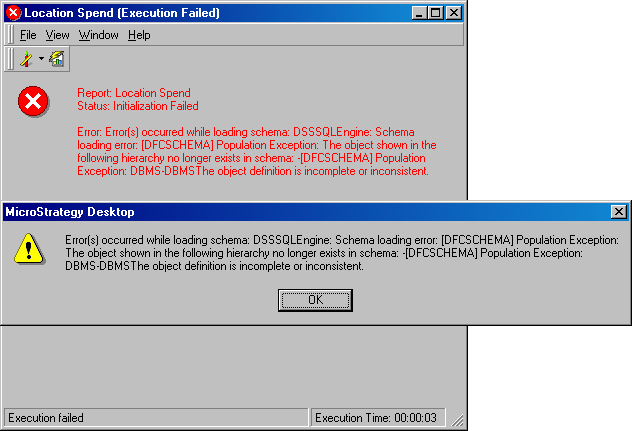
A user receives the following error when trying to run a report in Strategy Developer or Web:
 

ka02R000000kY0VQAU_0EM440000002F5v.jpeg

 
Error: Error(s) occurred while loading schema: DSSSQLEngine: Schema loading error: Population Exception: The object shown in the following hierarchy no longer exists in schema: - Population Exception: DBMS-DBMSThe object definition is incomplete or inconsistent.
CAUSE:
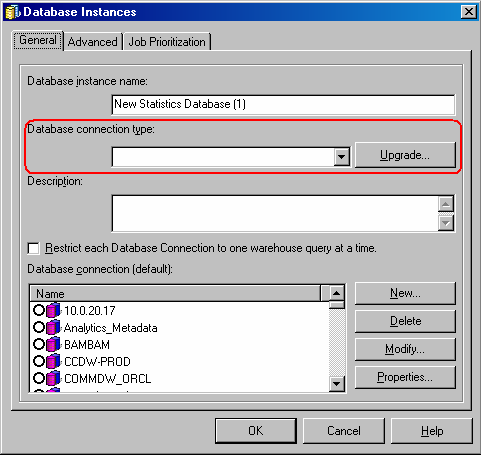
This error occurs because one of the database instances that the project has assigned is incorrectly defined.
 
ACTION:
Edit the database instances for the project with the error and make sure that they have a Database Connection Type assigned, as shown below:
 

ka02R000000kY0VQAU_0EM440000002F5q.jpeg

 
Restart the Strategy Intelligence Server to reflect the database instance changes.


Comment

0 comments

Details

Knowledge Article

Published:

June 12, 2017

Last Updated:

June 12, 2017