EducationSoftwareStrategy.com
StrategyCommunity

Knowledge Base

Product

Community

Knowledge Base

TopicsBrowse ArticlesDeveloper Zone

Product

Download SoftwareProduct DocumentationSecurity Hub

Education

Tutorial VideosSolution GalleryEducation courses

Community

GuidelinesGrandmastersEvents
x_social-icon_white.svglinkedin_social-icon_white.svg
Strategy logoCommunity

© Strategy Inc. All Rights Reserved.

LegalTerms of UsePrivacy Policy
  1. Home
  2. Topics

KB16897: 'Searching for "[object name]" resulted in no matches' error occurs when creating a new metric inside a Report Services document in MicroStrategy Developer 9.x


Stefan Zepeda

Salesforce Solutions Architect • Strategy


'Searching for "[object name]" resulted in no matches' error occurs when creating a new metric inside a Report Services document in MicroStrategy Developer 9.x

SYMPTOM:
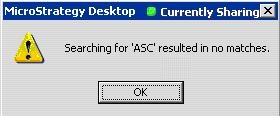
Users get the following error message when creating a new metric inside a Report Services document in Strategy Developer 9.x:
 

ka02R000000kcbkQAA_0EM440000002EvD.jpeg

 
searching for "" resulted in no matches
CAUSE:
This error occurs because of an inconsistent value loaded in memory.
 
ACTION:
In order to update this data in memory with the correct value, remove the dataset and add the dataset again.
 
NOTE: Refer to the following Strategy Knowledge Base technical notes for more information with similar issues:
 

  • KB8752 (KB5700-72X-0921): "Searching for '' resulted in no matches." error message appears when attempting to create a filter in Strategy Command Manager 7i - 7.2.x
  • KB11099 (KB5600-75x-1442): Errors appear when brackets are not used to enclose attribute and metric names in derived metric formulae in Strategy Web 7.5.x

Comment

0 comments

Details

Knowledge Article

Published:

April 11, 2017

Last Updated:

April 11, 2017