EducationSoftwareStrategy.com
StrategyCommunity

Knowledge Base

Product

Community

Knowledge Base

TopicsBrowse ArticlesDeveloper Zone

Product

Download SoftwareProduct DocumentationSecurity Hub

Education

Tutorial VideosSolution GalleryEducation courses

Community

GuidelinesGrandmastersEvents
x_social-icon_white.svglinkedin_social-icon_white.svg
Strategy logoCommunity

© Strategy Inc. All Rights Reserved.

LegalTerms of UsePrivacy Policy
  1. Home
  2. Topics

KB16919: How to rename subtotal headers in Microstrategy Developer 10.x


Stefan Zepeda

Salesforce Solutions Architect • Strategy


In Strategy Developer 10.x, users may change the name description of a subtotal header on a report grid to display a customized header. Follow the steps below to modify the subtotal header within Strategy Developer 10.x:
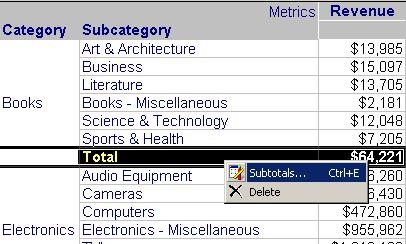
 

  • In grid mode, right click the subtotal and choose the 'Subtotals' menu, as shown below:
ka02R000000kciZQAQ_0EM440000002EvY.jpeg
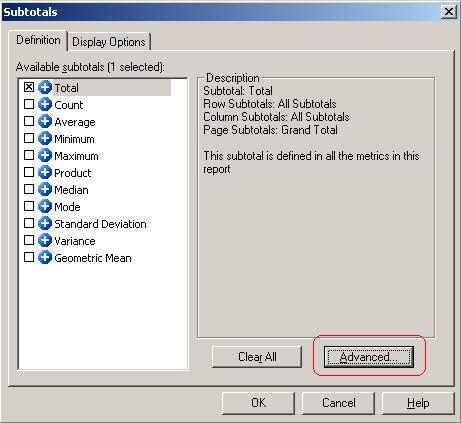
  • On the 'Subtotals' options window, click on the 'Advanced' button under the 'Definition' tab, as shown below:
ka02R000000kciZQAQ_0EM440000002EvV.jpeg
  • Within the 'Advanced Subtotals Options' window, create a new subtotal by clicking on the 'New' button, as shown below:
ka02R000000kciZQAQ_0EM440000002EvL.jpeg
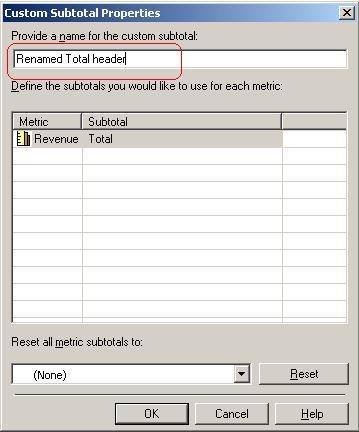
  • In the 'Custom Subtotal Properties' window, introduce the name for the subtotal header and click 'Ok', as shown below:
ka02R000000kciZQAQ_0EM440000002EvX.jpeg
  • On the 'Advanced subtotals options' window, the user will see a new custom subtotal added with the new name provided. Select the new subtotal and make sure all the 'Applied levels' are defined the same way that the original subtotal on the report has defined. Afterwards click 'Ok', as shown below:
ka02R000000kciZQAQ_0EM440000002Evf.jpeg
  • On the 'Subtotals' window, make sure to select the new custom header created and unselect the previous 'Total' selection and click 'Ok', as shown below:
ka02R000000kciZQAQ_0EM440000002EvS.jpeg

Notice the name of the Subtotal will change from 'Total' to the new named custom subtotal, as shown below:
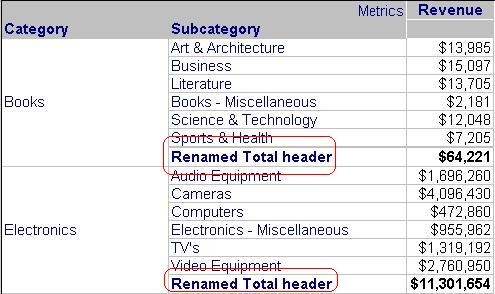
 

ka02R000000kciZQAQ_0EM440000002EvN.jpeg


Comment

0 comments

Details

Knowledge Article

Published:

April 3, 2017

Last Updated:

April 3, 2017