EducationSoftwareStrategy.com
StrategyCommunity

Knowledge Base

Product

Community

Knowledge Base

TopicsBrowse ArticlesDeveloper Zone

Product

Download SoftwareProduct DocumentationSecurity Hub

Education

Tutorial VideosSolution GalleryEducation courses

Community

GuidelinesGrandmastersEvents
x_social-icon_white.svglinkedin_social-icon_white.svg
Strategy logoCommunity

© Strategy Inc. All Rights Reserved.

LegalTerms of UsePrivacy Policy
  1. Home
  2. Topics

KB16925: Metric is not displaying correct values when dynamically aggregated in MicroStrategy Developer


Stefan Zepeda

Salesforce Solutions Architect • Strategy


Article outlines why a metric may display incorrect values when dynamically aggregated in MicroStrategy Developer

SYMPTOM:
A user opens a report in grid view and is able to see the results as expected in Strategy Developer, as shown below:
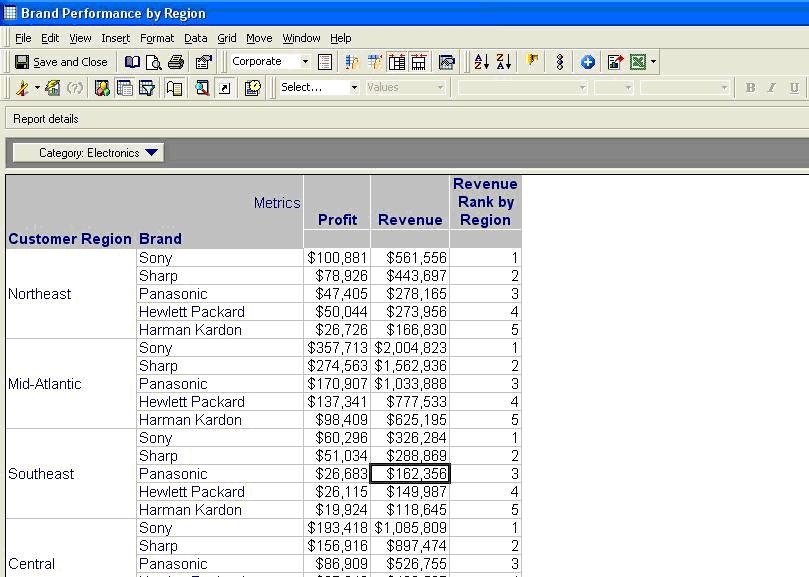
 

ka02R000000kY92QAE_0EM440000002F8c.jpeg

 
When the user moves one of the attributes to the Report objects window, the 'Revenue' metric behaves in an erratic way. Instead of displaying the calculated value that corresponds to the new level, it presents values that don't match data in the warehouse, as shown below:
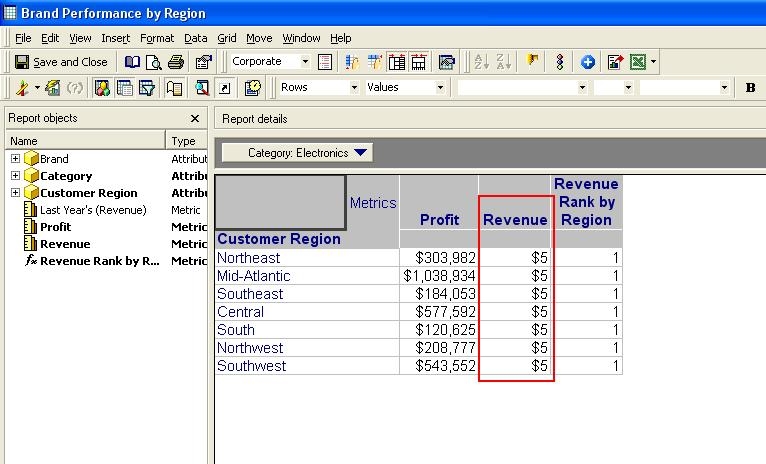
 

ka02R000000kY92QAE_0EM440000002F8e.jpeg

 
CAUSE:
The 'Dynamic aggregation function' for the metric is not set to the desired function; this causes the metric to perform a different operation over the warehouse values instead of the desired one.
 
ACTION:
Perform the following actions to resolve the issue:
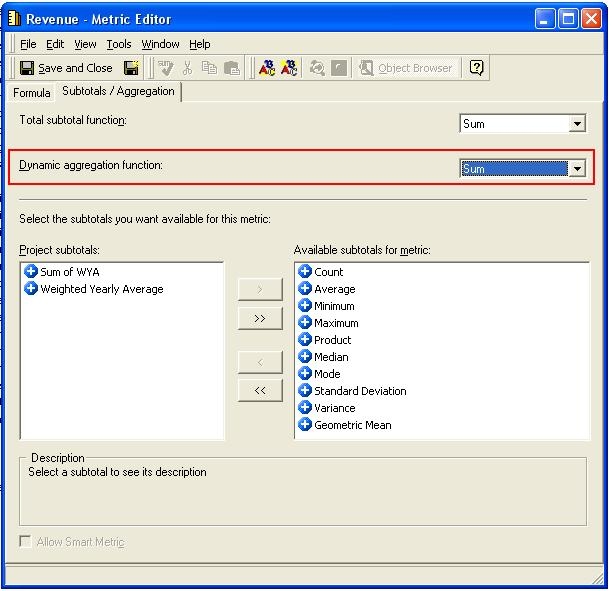
 

  • Open the Metric Editor for the 'Revenue' metric, select the 'Subtotals / Aggregation' tab, and modify the 'Dynamic Aggregation Function'. Set it to 'Sum', as shown below:
ka02R000000kY92QAE_0EM440000002F8b.jpeg
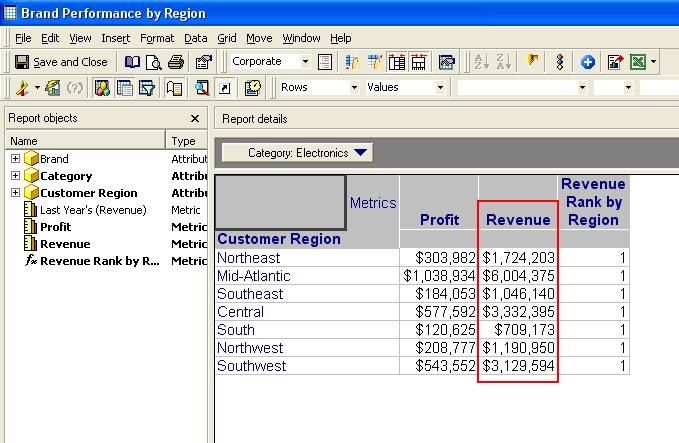
  • Save and Close the Metric Editor and re - execute the report. The metric shows the expected result, as shown below:
ka02R000000kY92QAE_0EM440000002F8d.jpeg

Comment

0 comments

Details

Knowledge Article

Published:

June 10, 2017

Last Updated:

June 10, 2017