EducationSoftwareStrategy.com
StrategyCommunity

Knowledge Base

Product

Community

Knowledge Base

TopicsBrowse ArticlesDeveloper Zone

Product

Download SoftwareProduct DocumentationSecurity Hub

Education

Tutorial VideosSolution GalleryEducation courses

Community

GuidelinesGrandmastersEvents
x_social-icon_white.svglinkedin_social-icon_white.svg
Strategy logoCommunity

© Strategy Inc. All Rights Reserved.

LegalTerms of UsePrivacy Policy
  1. Home
  2. Topics

KB16943: How to change the time zone for the System Message Viewer and DELog content in MicroStrategy Narrowcast Server


Community Admin

• Strategy


Article outlines how to change the time zone for the System Message Viewer and DELog content in MicroStrategy Narrowcast Server

The Strategy Distributed Logger controls the time zone for DELog files and the System Message Viewer; by default, the messages use the Universal Time Coordinates (UTC). Starting in Strategy Narrowcast Server, the user can modify the time zone that he wants to display inside the DELog file and for the System Message Viewer too, as shown below:

 

ka04W000000OeITQA0_0EM440000002BT0.jpeg

 
To change the time zone for the System Message Viewer and DELog content, perform the following steps:
 

  • Open the Strategy Narrowcast Server Administrator.
  • Go to System menu, select the desired system, and click on Governing Settings.
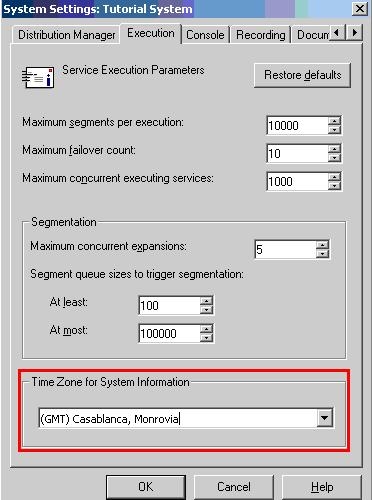
  • Select the Execution tab and change the time zone value to the desired one. By default, it uses the GMT (Greenwich Mean Time) time zone. Click Ok and exit the Governing Settings window, as shown below:
ka04W000000OeITQA0_0EM440000002BSt.jpeg
  •  
    NOTE: Formerly called Greenwich Mean Time, Universal Coordinated Time is also called Universal Time Coordinated (UTC) or Coordinated Universal Time (but always abbreviated UTC).
     
  • Restart the Strategy Logging Client and Strategy Logging Server services from Control Panel > Services for the changes to take effect.

After that, users will see that the data displayed in the System Message Viewer and inside the DELogs include the correct timestamp.
 
If the user wants to force it to use always the Universal Time Coordinates (UTC) and discard the setting specified inside the Strategy Narrowcast Server Administrator System settings, the user would need to follow the next steps:

 

  • Open the registry (Run> regedit) in the Strategy Narrowcast Server machine.
  • Browse to the location:
    HKEY_LOCAL_MACHINE\Software\Strategy\Strategy Broadcast Server\7.0\Distributed Logging Service\DistributedLogger
  • Change the UseUTC value to 1, as shown below:
ka04W000000OeITQA0_0EM440000002BT1.jpeg
  • Restart the Strategy Logging Client and Strategy Logging Server services from Control Panel > Services for the changes to take effect.

WARNING:Modifying registry values incorrectly may cause serious, system-wide problems that may require the re-installation of Strategy Intelligence Server Universal. Any edit of the registry is done at the user's own risk. Since these are user-initiated changes, they are not covered by any Strategy warranty. The user should back up the registry file prior to alterations.


Comment

0 comments

Details

Knowledge Article

Published:

June 12, 2017

Last Updated:

June 12, 2017