The Strategy Narrowcast Server 8.1.1 transmission recording feature stores information regarding service execution such as start/completion time of the services. By default, the timestamp stored in the transmission recording tables uses the Universal Time Coordinates (UTC). However, starting in Strategy Narrowcast Server 8.1.1, the user could modify the time zone to use for the stored data, as shown below:

To change the timestamp for the transmission recording information, perform the following steps:
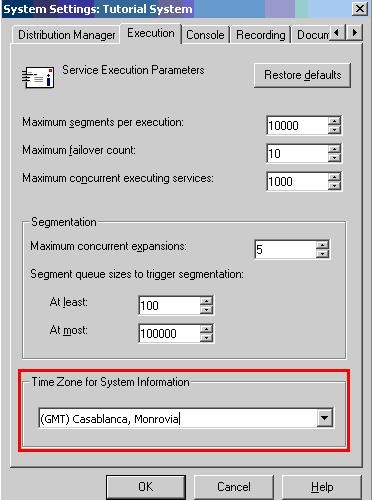
After that, users will see that the data recorded in the Transmission recording tables include the correct timestamp.
If the user wants to force it to use always the Universal Time Coordinates (UTC) and discard the setting specified inside the Strategy Narrowcast Server 8.1.1 Administrator System settings, the user would need to follow the next steps:

WARNING: Modifying registry values incorrectly may cause serious, system-wide problems that may require the re-installation of Strategy Intelligence Server Universal. Any edit of the registry is done at the user's own risk. Since these are user-initiated changes, they are not covered by any Strategy warranty. The user should back up the registry file prior to alterations.
