EducationSoftwareStrategy.com
StrategyCommunity

Knowledge Base

Product

Community

Knowledge Base

TopicsBrowse ArticlesDeveloper Zone

Product

Download SoftwareProduct DocumentationSecurity Hub

Education

Tutorial VideosSolution GalleryEducation courses

Community

GuidelinesGrandmastersEvents
x_social-icon_white.svglinkedin_social-icon_white.svg
Strategy logoCommunity

© Strategy Inc. All Rights Reserved.

LegalTerms of UsePrivacy Policy
  1. Home
  2. Topics

KB16967: What is anti-aliasing and how is it supported for MicroStrategy Developer graph displays?


Stefan Zepeda

Salesforce Solutions Architect • Strategy


This Technical Note explains what is anti-aliasing and how is it supported for MicroStrategy Developer graph displays

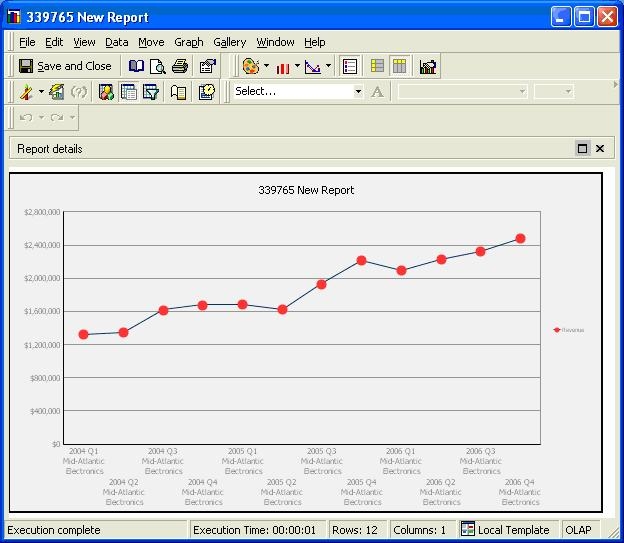
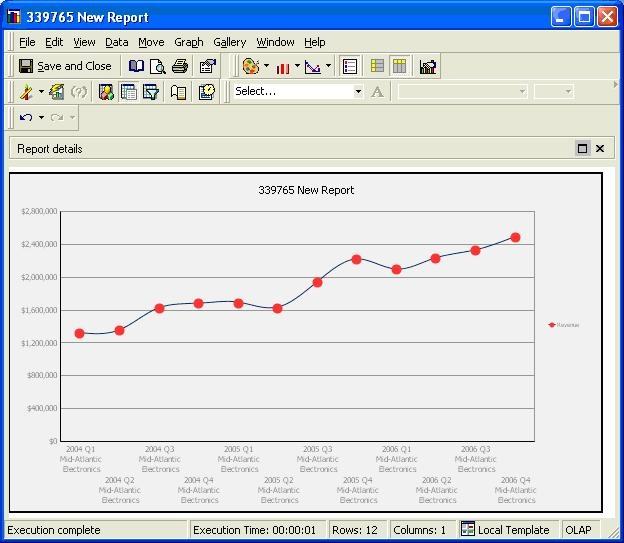
Anti-aliasing is a system whereby the edges of letters or lines use shades between the color of the type or line and the color of the background to 'smoothen' any curved line.
 
An aliased graph (which is the default setting) will look like the image below:
ka02R000000kX99QAE_0EM440000002F8H.jpeg

An anti-aliased graph will look like the image below:
ka02R000000kX99QAE_0EM440000002F87.jpeg

 
This setting can be changed by the Graph > Preferences > Enable Curved Lines setting as shown below for Strategy Developer 9.x and newer:

ka02R000000kX99QAE_0EM440000002F8G.jpeg


Comment

0 comments

Details

Knowledge Article

Published:

April 7, 2017

Last Updated:

April 7, 2017