EducationSoftwareStrategy.com
StrategyCommunity

Knowledge Base

Product

Community

Knowledge Base

TopicsBrowse ArticlesDeveloper Zone

Product

Download SoftwareProduct DocumentationSecurity Hub

Education

Tutorial VideosSolution GalleryEducation courses

Community

GuidelinesGrandmastersEvents
x_social-icon_white.svglinkedin_social-icon_white.svg
Strategy logoCommunity

© Strategy Inc. All Rights Reserved.

LegalTerms of UsePrivacy Policy
  1. Home
  2. Topics

KB16979: 'The child of an attribute in the template may not be used to restrict the data' error appears when executing an OLAP cube report in MicroStrategy


Community Admin

• Strategy


This article notes a limitation of MDX data sources for filters on different levels

SYMPTOM
 
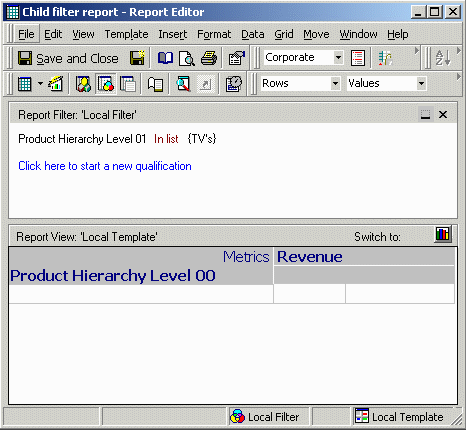
An OLAP Cube report with the following definition is created. Note that the two Product Hierarchy attributes belong to the same cube hierarchy, and that the Level 01 attribute is a child of Level 00.
ka04W000000OhYqQAK_0EM440000002F8I.gif

 
When the report is executed, or when MDX is generated, the following error occurs:

ka04W000000OhYqQAK_0EM440000002F8J.gif

 
Error: MDX Engine encountered an exception This report includes a filtering condition that is not supported. The child of an attribute in the template may not be used to restrict the data returned unless that child attribute is also included in the template.]
Error in Process method of Component: SQLEngineServer, Project Strategy Tutorial, Job 516, Error Code= -2147212793.
 
CAUSE
 
This error is the result of a limitation in the handling of filters in MDX, which in turn stems from the manner of data storage and retrieval in multidimensional databases.
Multidimensional databases achieve rapid query response by storing metric (measure) values at all cube levels simultaneously. Retrieving sales figures at product category level is fundamentally the same operation as retrieving the figures at product subcategory level: in both cases, the database needs only to look at the proper coordinates in the cube and return the precalculated value stored there.
By contrast, in relational databases, data are usually stored at only a few physical levels. Other analysis levels are simulated by aggregating, at runtime, a lower or more detailed level of physical data to the desired level.
When a template attribute is at a higher level (e.g., Category) and one of its children is in the filter (Subcategory), it is a simple matter in SQL to filter Subcategory-level fact data and aggregate to Category level. For standard metrics in multidimensional databases, however, only precalculated values may be returned, and the metric values are not precalculated in advance to handle every conceivable lower-level filter. Therefore, the MDX for the report illustrated above would not yield the expected results.
Since the report results would not be correct, Strategy produces the error as a warning that the report definition is not valid for MDX.
 
ACTION
 
One of two means may be used to obtain the desired result.

  • If OLAP Services are available, the filtering attribute may be added to the Report objects window. This would cause MDX to be generated at the level of the child attribute, in which case the filtering is a simple matter. The results are displayed at the desired level through dynamic aggregation.
    Note that this approach is subject to the same rules as dynamic aggregation in a standard relational report. Certain types of aggregation, most notably Average and Count Distinct, are not automatically supported in dynamic aggregation because the results may be different from the results obtained by evaluating these functions on the database side in the SQL query. For more details, consult the following Strategy Knowledge Base article.
  • KB7492: Metrics display two dashes (--) when removing attributes from the report view in Strategy SQL OLAP Services
     
  • MDX pass-through expressions in OLAP cube compound metrics (supported as of Strategy) can define the proper aggregation over a filtered set of lower-level metric values. The general form of the pass-through expression should be:
    Sum({ Intersect(Descendants([hierarchy ID].CurrentMember, [child_filtering_level]), { [set_of_filter_elements] }) }, [metric ID])
  • For instance, to obtain the correct result for the above report, a metric against a Microsoft Analysis Services data source may be defined as follows:
ka04W000000OhYqQAK_0EM440000002F8D.gif
  •  
    ApplySimple("Sum({ Intersect(Descendants([Product].CurrentMember, [Product].[Product Subcategory]), { #0 }) }, #1)", ?[Choose from all elements of 'Product Subcategory'.], [Warehouse Sales])
  • Here, the set of Subcategory elements on which to filter comes from a prompt answer. A fixed set of elements could just as easily be hard coded into the formula in place of #0. When a report with the Product Category attribute and the above compound metric is executed, and two Subcategory elements chosen, the following results are returned. The unfiltered Warehouse Sales metric is included, to show that the filtered values are smaller than the corresponding values for the entire Category.
ka04W000000OhYqQAK_0EM440000002F8E.gif
  • Note: In internal testing, a formula of this type returned incorrect results against SAP BW 3.5. However, it behaved as expected against SAP BW 7.0 (2004S).
     
    For details on using custom MDX expressions in Strategy, consult the following Strategy Knowledge Base article:
    KB16057: How to create customized metric expressions for OLAP Cube data sources in Strategy Engine
     

Comment

0 comments

Details

Knowledge Article

Published:

May 15, 2017

Last Updated:

May 15, 2017