EducationSoftwareStrategy.com
StrategyCommunity

Knowledge Base

Product

Community

Knowledge Base

TopicsBrowse ArticlesDeveloper Zone

Product

Download SoftwareProduct DocumentationSecurity Hub

Education

Tutorial VideosSolution GalleryEducation courses

Community

GuidelinesGrandmastersEvents
x_social-icon_white.svglinkedin_social-icon_white.svg
Strategy logoCommunity

© Strategy Inc. All Rights Reserved.

LegalTerms of UsePrivacy Policy
  1. Home
  2. Topics

KB16989: Unable to expand or collapse reports with outline in Report Services documents in MicroStrategy Web 9.x and 10.x.


Community Admin

• Strategy


Explains the limitations of outline mode in Report Service Document grids.

SYMPTOM:
When a report with outline mode enabled is placed inside a Report Services document, it is not possible to expand or collapse the report objects in Strategy Web 9.x and 10.x.
 
STEPS TO REPRODUCE:
Follow the steps below to reproduce this issue in the Strategy Tutorial project:
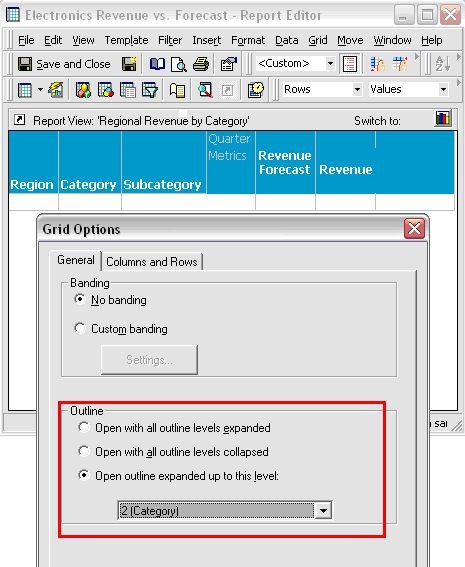
 

  • Create a report in Strategy Desktop and enable the outline functionality, as shown below:
ka04W000000OdhXQAS_0EM4400000028hP.jpeg
  • Execute the report in Strategy Desktop/Developer:
ka04W000000OdhXQAS_0EM4400000028hR.jpeg
  • Execute the report in Strategy Web:
ka04W000000OdhXQAS_0EM4400000028hU.jpeg
  • Add the report as a dataset in a Report Services document:
ka04W000000OdhXQAS_0EM4400000028hS.jpeg
  • Execute the document in Strategy Web:
ka04W000000OdhXQAS_0EM4400000028ha.jpeg
  •  
    The outline option is not available and the document's results appear expanded.
     

CAUSE:
The outline functionality is not currently available for Report Services documents.
 
ACTION:
This issue was reviewed by our Technology team for feasibility and will not be scoped for a code fix in any upcoming Strategy release.


Comment

0 comments

Details

Knowledge Article

Published:

April 5, 2017

Last Updated:

April 5, 2017