EducationSoftwareStrategy.com
StrategyCommunity

Knowledge Base

Product

Community

Knowledge Base

TopicsBrowse ArticlesDeveloper Zone

Product

Download SoftwareProduct DocumentationSecurity Hub

Education

Tutorial VideosSolution GalleryEducation courses

Community

GuidelinesGrandmastersEvents
x_social-icon_white.svglinkedin_social-icon_white.svg
Strategy logoCommunity

© Strategy Inc. All Rights Reserved.

LegalTerms of UsePrivacy Policy
  1. Home
  2. Topics

KB17015: How is the "Job Priority Map" attribute used in MicroStrategy Enterprise Manager 9.x?


Community Admin

• Strategy


Job Priority defines the order in which jobs are processed. Jobs are usually executed on a first-come, first-served basis; however, users sometimes have certain jobs that they want to be processed before other jobs. For this purpose, users can assign one of the three possible job priorities of high, medium, and low to a job (report or document). Users can also choose the variables that determine a job's priority. The possible variables to choose from are Request type, Application type, User Group, Cost and Project. This article used cost-based prioritization as an example. Users can refer to the System Administration guide on the rest of the 4 variables.
 
Report Costis an arbitrary value that can be assigned to a report to help determine its priority in relation to other requests. The set of cost groupings must cover all values from 0 to 999.
 
Consider the following scenario:

  • A user creates a set of report costs and assigns different weights to those costs, as shown below:
ka04W000000OeX2QAK_0EM440000002BRN.jpeg
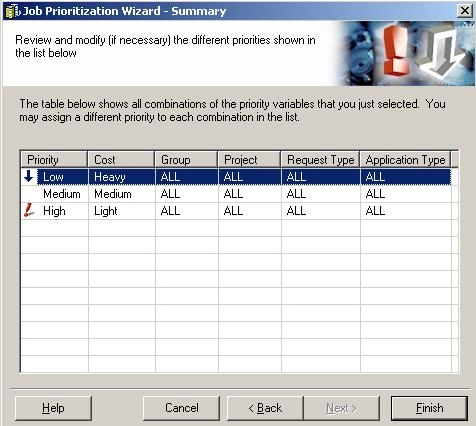
  • After assigning the set of report cost groupings, the user specifies all Heavy reports to have a low job priority, Medium reports to have a medium job priority, and Light reports to have a high job priority, as shown below:
ka04W000000OeX2QAK_0EM440000002BRO.jpeg
  • The user then executes a report with the set of report cost groupings (step 2) and a job cost of 800. When the report is executed, this information is recorded in the IS_REPORT_STATS table in the PRIORITYNUMBER and JOBCOST columns.
     

    Note: The PRIORITYNUMBER is the upper limit of the range of priority (LOW, MEDIUM, HIGH) of the report execution and the JOBCOST is the cost that is assigned to the individual report. Job cost of 800 falls in the third row of the report cost grouping and since the upper limit of that grouping is 999, the job priority becomes 999 which is assigned to the column PRIORITYNUMBER.


  • After the data load, the above numbers from the IS_REPORT_STATS table are transferred into the IS_REP_FACT table in columns IS_REP_PRIO_NBR and IS_REP_COST_NBR, respectively.
     

    Note: IS_REP_PRIO_NBR and IS_REP_COST_NBR columns in the IS_REP_FACT table are mapped to columns PRIORITYNUMBER and JOBCOST in the IS_REPORT_STATS table.


  • The user now creates a Strategy Enterprise Manager 9.x report with the attributes Job Priority Map, Job Priority Nbr, and Report Job to analyze the report jobs that are executed with different job priorities of Low, Medium, High, against the warehouse. This is possible through the Job Priority Map attribute. The SQL generated from this report looks like below:
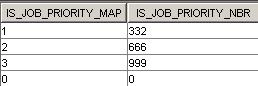
  • IS_PRIORITY_MAP is an indicator lookup table that stores the priority map information, as shown below:


ka04W000000OeX2QAK_0EM440000002BRM.jpeg

  • In the above table:
    1 = High Priority
    2 = Medium Priority
    3 = Low Priority


    Similarly, IS_JOB_PRIORITY is a lookup table that stores job priority indicator information as seen below.


ka04W000000OeX2QAK_0EM440000002BRL.jpeg
  • When the report created in Step 5 is executed (shown below), the IS_REP_PRIO_NBR from IS_REP_FACT table, which is 999 from Step 3 is mapped to the IS_JOB_PRIORITY_NBR in the IS_PRIORITY_MAP table to get the IS_JOB_PRIORITY_MAP number of 3. This information is further mapped to the IS_JOB_PRIORITY table with the column IS_JOB_PRIORITY_ID to get the IS_JOB_PRIORITY_DESC of Low Priority. And this is how the attribute 'Job Priority Map' gets its value.
ka04W000000OeX2QAK_0EM440000002BRH.jpeg

Comment

0 comments

Details

Knowledge Article

Published:

June 9, 2017

Last Updated:

June 9, 2017