SYMPTOM:
Users are able to see Strategy Narrowcast systems but are unable to register them due to the following error:

There is no Narrowcast Server account for this NT Login (CORP\sjones). You must log into Windows using an NT login that has been configured as a Narrowcast Server account.
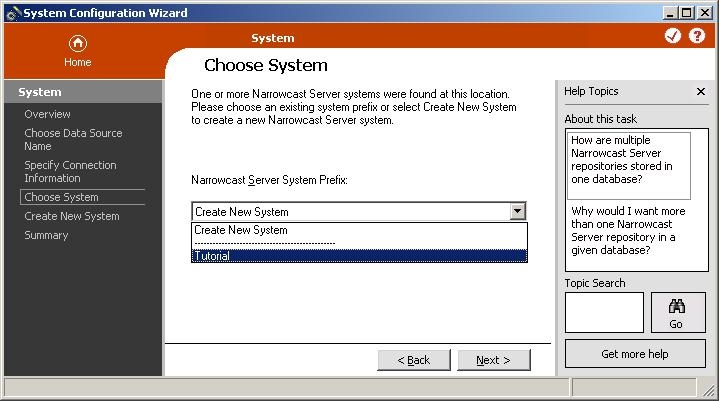
The users are able to create a new system at this point, but will be unable to register the existing systems not associated with their account in the repository.
When creating a Strategy Narrowcast Server system, two accounts are created within the Object Repository by default. The first account is the Windows login of the user currently logged into the system and the other is the local machine administrator account.
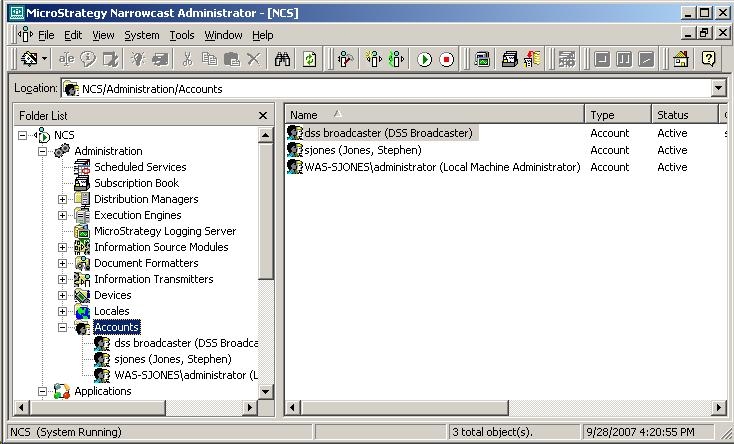
Other users that try to register the system must be specified first within the Strategy Narrowcast system. The accounts are stored within the Object Repository; when users are trying to register the system, the current account is then verified against what is stored within the Object Repository. If a match does not exist, then the error message will occur.
To give access to that user, the account must first be created within Strategy Narrowcast Administrator. In the Accounts section of the system's Administration section, right-click and choose new account. The following dialogue will appear to specify the Windows user account:

ACTION:
If one of the other accounts is still valid, such as the local machine administrator account, the system can be registered under that user and then additional accounts within the system can be created.
