EducationSoftwareStrategy.com
StrategyCommunity

Knowledge Base

Product

Community

Knowledge Base

TopicsBrowse ArticlesDeveloper Zone

Product

Download SoftwareProduct DocumentationSecurity Hub

Education

Tutorial VideosSolution GalleryEducation courses

Community

GuidelinesGrandmastersEvents
x_social-icon_white.svglinkedin_social-icon_white.svg
Strategy logoCommunity

© Strategy Inc. All Rights Reserved.

LegalTerms of UsePrivacy Policy
  1. Home
  2. Topics

KB17093: How to use segmentation prompts in MicroStrategy Narrowcast Server 9.x to create smaller jobs on MicroStrategy Intelligence Server 9.x


Community Admin

• Strategy


Using personalized page execution can create large jobs on the Strategy Intelligence Server when a Strategy Narrowcast Server service has large segment size personalized documents. One way to create smaller jobs per segment is by using a segmentation information object in conjunction with segmentation prompts on the dataset reports of a Report Services document.  These features, used together, will reduce the size of the job (content to be eventually delivered by Narrowcast Server) sent to the Intelligence Server per segment.  To use these features, follow the steps below:
 
In Strategy Desktop 9.x:
 

  • Create two numeric value prompts and name them 'Segment Start' and 'Segment End'. Make sure these prompts are required and contain no default, minimum or maximum values.
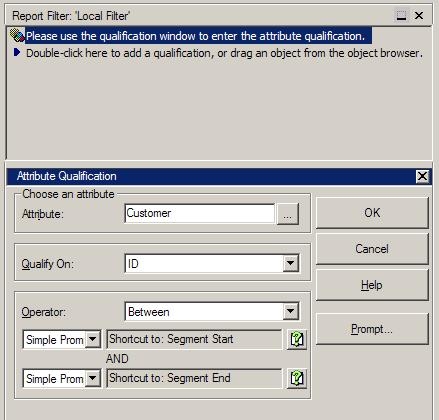
  • In each dataset report, create an attribute qualification in the report filter and qualify on the slicing attribute's ID form.
  • Select the operator to be Between and insert the value prompts created in step 1 into the 'Between' parameters, as shown below:
ka04W000000OgpbQAC_0EM440000002BR7.jpeg
  • Repeat steps 2 and 3 for each dataset in the document. Make sure the prompts are applied to the same attribute in each report.
     

Once those steps have been completed, follow the next steps:
 
In Strategy Narrowcast Server 9.x:
 

  1. Create a new information object of type segmentation and select the segmentation report created by using the following Strategy Knowledge Base technical note:
     

  2. KB7936: How to create a Segment Information Object for a Strategy Narrowcast Server 7.2.x, 7.5.x, and 8.0.x system?


  • In the Dynamic Subscription Set Editor, on the page selecting the Subscription information object, select the check box detailing the segmentation information object, as shown below:
ka04W000000OgpbQAC_0EM440000002BR6.jpeg
  • Select Next and navigate to the Segmentation information object created in step 4.
  • Save these changes to the dynamic subscription set.
  • Create a linked document that points to the Report Services document whose datasets were modified in steps 1-4.
  • Click the Advanced button.
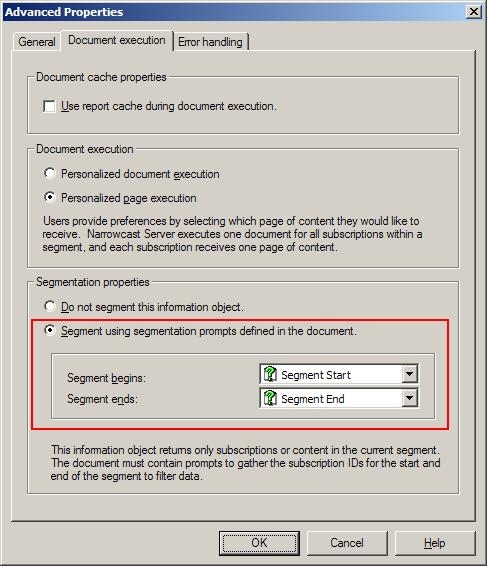
  • In the Document Execution tab, in the Segmentation section, select the option to segment with the use of prompts and select the two prompts created in step 1. Make sure to put the prompts in the correct spaces.
ka04W000000OgpbQAC_0EM440000002BR5.jpeg
  • Save this document.
  • Insert this document into your service and run it. The Strategy Intelligence Server will be runnning smaller jobs for each of the dataset reports. Below is an example of a modified dataset report executing against the Strategy Intelligence Server with the Strategy Narrowcast Server service segment size set to 10, as shown below:
ka04W000000OgpbQAC_0EM440000002BR4.jpeg

Comment

0 comments

Details

Knowledge Article

Published:

June 8, 2017

Last Updated:

June 8, 2017