EducationSoftwareStrategy.com
StrategyCommunity

Knowledge Base

Product

Community

Knowledge Base

TopicsBrowse ArticlesDeveloper Zone

Product

Download SoftwareProduct DocumentationSecurity Hub

Education

Tutorial VideosSolution GalleryEducation courses

Community

GuidelinesGrandmastersEvents
x_social-icon_white.svglinkedin_social-icon_white.svg
Strategy logoCommunity

© Strategy Inc. All Rights Reserved.

LegalTerms of UsePrivacy Policy
  1. Home
  2. Topics

KB17109: How to report on Report Job Priorities from MicroStrategy Enterprise Manager 9.x


Community Admin

• Strategy


Users may also follow the steps outlined in the following Strategy Knowledge Base technical note to report on the job priorities for report job execution from Strategy Enterprise Manager 9.x: 
KB17015 (KB6400-8X-0504): How is the 'Job Priority Map' attribute used in Strategy Enterprise Manager 9.x?
For users wishing to see a concise and clear picture of the job priorities taken by a job (executing SQL) on the Strategy Intelligence Server 9.x, the following steps are suggested:
 
Note: The job priority as set on the database instance only applies to executions against the warehouse. Priorities for jobs that do not run against the warehouse may be different from the priority assigned through the job prioritization dialog.
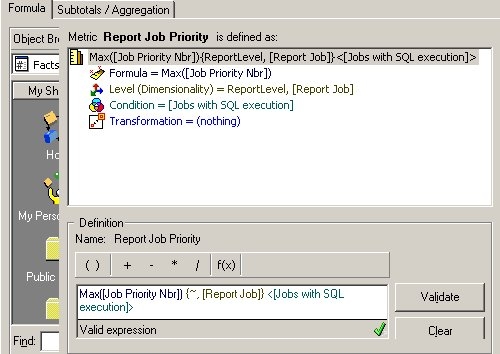
 

  • Create a Metric based off the "Job Priority Nbr" attribute as shown below. By including the filter for only jobs following the SQL Execution step, this metric will exclude the jobs that hit cache etc. Also the metric should be calculated at the report job level if not included on the template.
ka04W000000OeUjQAK_0EM440000002BQZ.jpeg
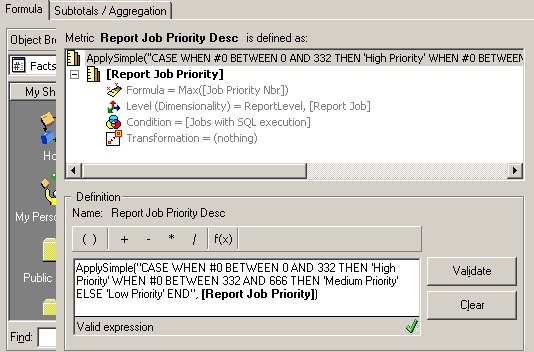
  • Now since the job priority number is still just a number, users need to convert it to a description "High Priority", "Low Priority" etc. This can be done using an ApplySimple statement shown below using SQL Server syntax. Users can modify this to the syntax required for whatever database is being used.
ka04W000000OeUjQAK_0EM440000002BQT.jpeg
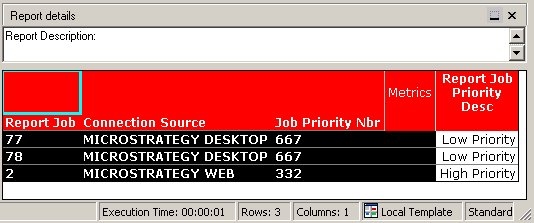
  • The report can then be built as shown below, and the user may test this to verify that this meets requirements.
ka04W000000OeUjQAK_0EM440000002BQV.jpeg

Comment

0 comments

Details

Knowledge Article

Published:

June 9, 2017

Last Updated:

June 9, 2017