The number of processors available for use by Strategy Intelligence Server Universal 9.x - 10.x on an AIX machine can be determined from Strategy Service Manager > Options > Intelligence Server Options, as shown in the image below:
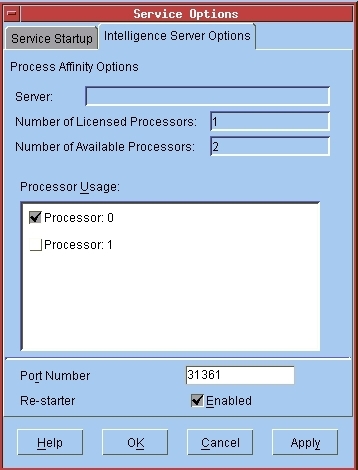
To view this information, Strategy Intelligence Server Universal 9.x - 10.x must be registered as a service. Otherwise, these options will be grayed out and thus the processor information will be unavailable in Service Manager. A couple of situations under which Strategy Intelligence Server Universal 9.x - 10.x cannot be registered as a service on AIX are:
When the processor information is unavailable through Service Manager, the following method may be used to determine the number of processors available for use by Strategy Intelligence Server Universal 9.x-10.x:

NOTE:
The number of processors being actually used by Strategy Intelligence Server Universal 9.x-10.x may be different from the number of available processors. To determine the number of processors being actually used by Strategy Intelligence Server Universal 9.x-10.x on the AIX machine, users may follow the steps below:
These are listed in detail as Steps (A) and (B) in the following Strategy Knowledge Base technical note:
KB13294: How to specify that MicroStrategy Intelligence Server Universal 9.x - 10.x should run with a pre-defined set of processors using command line parameters on AIX
Third Party Software Installation:
WARNING:
The third-party product(s) discussed in this technical note is manufactured by vendors independent of Strategy. Strategy makes no warranty, express, implied or otherwise, regarding this product, including its performance or reliability.
