A bootstrap error indicates that the dashboard viewer was unable to load all of the data necessary to render the document. This can fail to load for a number of reasons, generally involving various timeouts.
When a large amount of data has to be sent to the dashboard viewer, a timeout may occur at several points.
A request timeout may be reached at the Strategy Web 8.1.x level.
If that timeout is set correctly and a bootstrap error still occurs, the underlying ASP.NET process may be timing out. This only applies when IIS is used as the application server, other application servers may have their own timeout settings.
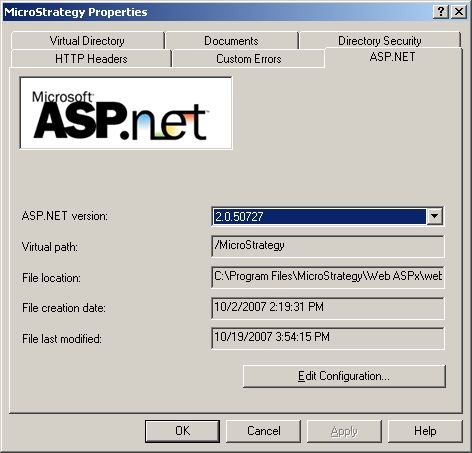
To set the ASP.NET timeout, open the Internet Services Manager, and open the properties of the Strategy virtual directory (in IIS 5.0) or Application Pool (in IIS 6.0). Select the ASP.NET tab, then click to edit configuration, as shown below:
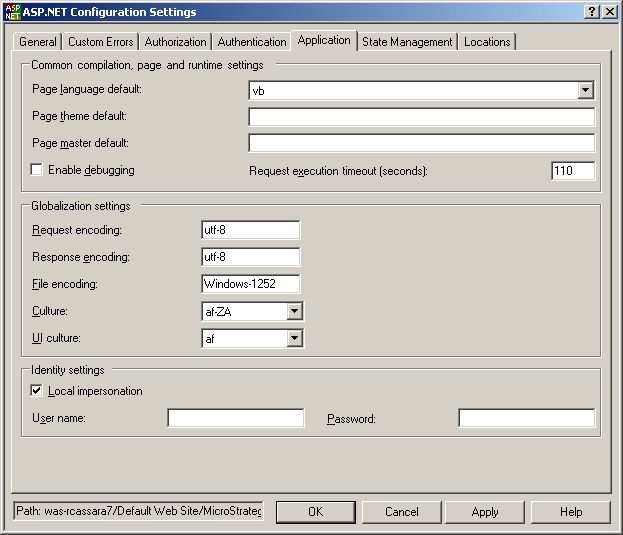
In the ASP.NET configuration, select the Application tab to find the execution request timeout (set by default to 110 seconds), as shown below:
For IIS 7.x refer to KB35666: How to edit the setting for the Request execution timeout for ASP.NET installations in Internet Information Services (IIS) 7 and Strategy Web 9.x and 10.x
46532
