EducationSoftwareStrategy.com
StrategyCommunity

Knowledge Base

Product

Community

Knowledge Base

TopicsBrowse ArticlesDeveloper Zone

Product

Download SoftwareProduct DocumentationSecurity Hub

Education

Tutorial VideosSolution GalleryEducation courses

Community

GuidelinesGrandmastersEvents
x_social-icon_white.svglinkedin_social-icon_white.svg
Strategy logoCommunity

© Strategy Inc. All Rights Reserved.

LegalTerms of UsePrivacy Policy
  1. Home
  2. Topics

KB17249: Freeform SQL reports in MicroStrategy Enterprise Manager do not execute against DB2 warehouse and the error 'QueryEngine encountered error:…. STRING REPRESENTATION OF DATETIME VALUE HAS INVALID SYNTAX' occurs


Community Admin

• Strategy


Freeform SQL reports in MicroStrategy Enterprise Manager 9.x do not execute against DB2 warehouse and the error 'QueryEngine encountered error:…. STRING REPRESENTATION OF DATETIME VALUE HAS INVALID SYNTAX' occurs

SYMPTOM:
The following freeform SQL reports shipped with Strategy Enterprise Manager 9.x error out during execution against DB2 warehouse:
 

  • 101. Recently Completed Jobs
  • 102. Recent Sessions, Users
  • 103. Recently Completed Scheduled Jobs

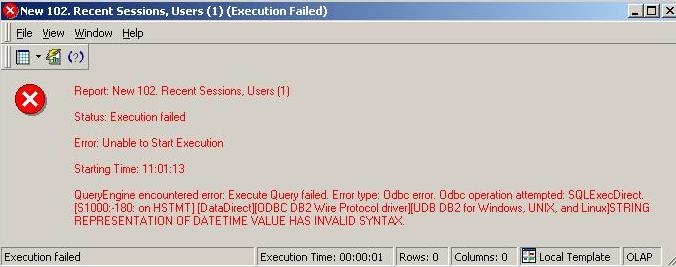
The following error message is received:
 

ka04W000000Oe4gQAC_0EM440000002BNm.jpeg

 
"QueryEngine encountered error: Execute Query failed. Error type: Odbc error. Odbc operation attempted: SQLExecDirect. STRING REPRESENTATION OF DATETIME VALUE HAS INVALID SYNTAX."
CAUSE:
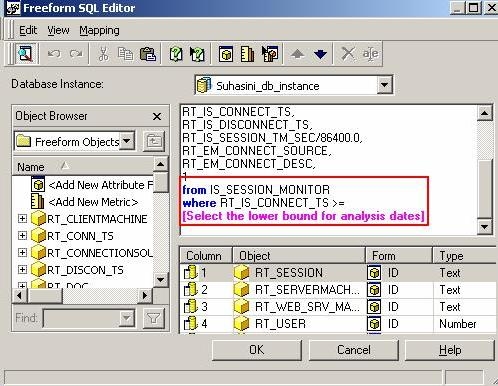
All the above given freeform SQL reports contain a SQL statement that performs a comparison between 'Timestamp' datatype and 'Date' datatype. The following example is from the report '102. Recent Sessions, Users':
ka04W000000Oe4gQAC_0EM440000002BNj.jpeg

 
…………..
from IS_SESSION_MONITOR
where RT_IS_CONNECT_TS >=
RT_IS_CONNECT_TS is a column in the database that is defined as 'Timestamp' datatype. 'Select the lower bound for analysis date' is a date prompt created within Strategy and is of a 'Date' datatype.
 
DB2 database cannot compare a 'Date' value to 'Timestamp' datatype and results in the generation of the above error.
 
WORKAROUND:
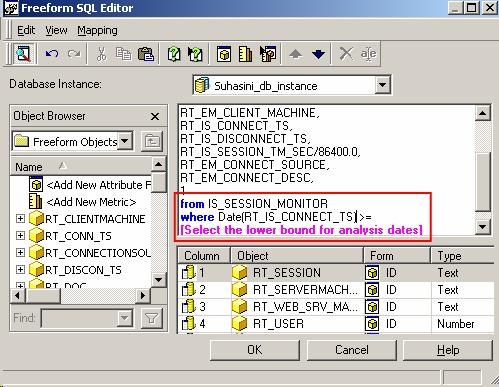
The workaround is same for all the reports and it is required to modify the SQL in the freeform SQL definition to the following i.e., cast the timestamp column to a 'DATE' datatype.  
 
…………..
from IS_SESSION_MONITOR
where Date(RT_IS_CONNECT_TS) >=
ka04W000000Oe4gQAC_0EM440000002BNl.jpeg


Comment

0 comments

Details

Knowledge Article

Published:

June 14, 2017

Last Updated:

June 14, 2017