EducationSoftwareStrategy.com
StrategyCommunity

Knowledge Base

Product

Community

Knowledge Base

TopicsBrowse ArticlesDeveloper Zone

Product

Download SoftwareProduct DocumentationSecurity Hub

Education

Tutorial VideosSolution GalleryEducation courses

Community

GuidelinesGrandmastersEvents
x_social-icon_white.svglinkedin_social-icon_white.svg
Strategy logoCommunity

© Strategy Inc. All Rights Reserved.

LegalTerms of UsePrivacy Policy
  1. Home
  2. Topics

KB17331: Users are unable to add object prompts to the grid of reports


Stefan Zepeda

Salesforce Solutions Architect • Strategy


While attempting to add an object prompt to the rows or columns, the options when right clicking to add the object prompt are greyed out and unavailable to add to the grid.

SYMPTOM:
While attempting to add an object prompt to the rows or columns, the options when right clicking to add the object prompt are greyed out and unavailable to add to the grid.
 
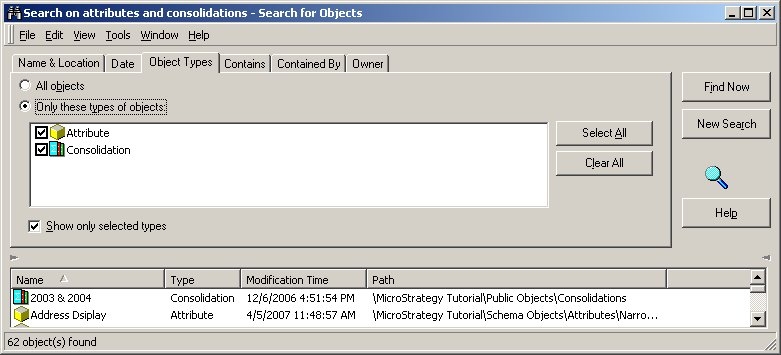
The object prompt is using the results of a search object. The search object is defined to search for only the object types of attributes and consolidations as shown below :
 

ka02R000000kXSJQA2_0EM440000002F4D.jpeg

 
CAUSE:
An object prompt can only be placed on a grid when it contains one type of object. Additionally, the type of objects selected by the object prompt must be available to be placed on a grid, for example metrics or attributes.
 
ACTION:
When placing an object prompt on a grid, verify that it contains only one type of object and that all objects are valid grid objects.
 
WORKAROUND:
To achieve the functionality of having an object prompt on a grid which contains multiple objects, follow the steps below:
 

  1. Place a simple object prompt on a grid.
  2. Edit the object prompt and use a search object results to display results. Within the search object choose the types of objects that are required.
  3. The report will now contain an object prompt which will display multiple types of objects.

Comment

0 comments

Details

Knowledge Article

Published:

June 15, 2017

Last Updated:

June 15, 2017