EducationSoftwareStrategy.com
StrategyCommunity

Knowledge Base

Product

Community

Knowledge Base

TopicsBrowse ArticlesDeveloper Zone

Product

Download SoftwareProduct DocumentationSecurity Hub

Education

Tutorial VideosSolution GalleryEducation courses

Community

GuidelinesGrandmastersEvents
x_social-icon_white.svglinkedin_social-icon_white.svg
Strategy logoCommunity

© Strategy Inc. All Rights Reserved.

LegalTerms of UsePrivacy Policy
  1. Home
  2. Topics

KB17372: Users get ‘Error Loading DLL(M4UIEN.DLL).The DLL Does Not Exist or is not in the path’ when trying to use MicroStrategy Developer 10.x


Stefan Zepeda

Salesforce Solutions Architect • Strategy


This article describes an error when trying to launch Microstrategy Developer 10.x ‘Error Loading DLL(M4UIEN.DLL).The DLL Does Not Exist or is not in the path’

SYMPTOM:
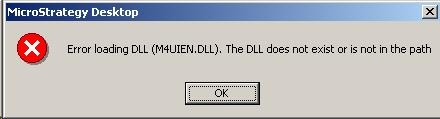
When launching Strategy Developer 10.x, expanding a project or running a report from Strategy Dveloper 10.x, users may receive the following error:
 

ka02R000000kc2GQAQ_0EM440000002F32.jpeg

 
Error Loading DLL(M4UIEN.DLL).The DLL Does Not Exist or is not in the path
CAUSE:
This may be caused by a Cisco Security Agent application. The application can modify or deny access to .DLLs that Strategy uses when launching Strategy Developer 10.x or performing tasks within Strategy Developer 10.x
 
ACTION:
Disable the Cisco Security Agent application or contact your IT department about tweaking / modifying this application so that Strategy Desktop can access the .DLL files properly
 
Third Party Software Installation WARNING:
The third-party product(s) discussed in this technical note is manufactured by vendors independent of Strategy. Strategy makes no warranty, express, implied or otherwise, regarding this product, including its performance or reliability.


Comment

0 comments

Details

Knowledge Article

Published:

June 1, 2017

Last Updated:

June 1, 2017