EducationSoftwareStrategy.com
StrategyCommunity

Knowledge Base

Product

Community

Knowledge Base

TopicsBrowse ArticlesDeveloper Zone

Product

Download SoftwareProduct DocumentationSecurity Hub

Education

Tutorial VideosSolution GalleryEducation courses

Community

GuidelinesGrandmastersEvents
x_social-icon_white.svglinkedin_social-icon_white.svg
Strategy logoCommunity

© Strategy Inc. All Rights Reserved.

LegalTerms of UsePrivacy Policy
  1. Home
  2. Topics

KB17389: User sees the message 'Statistics property not available. System default is used! MAX_SQL_LENGTH = 64000' written to the DSSErrors.log during the start-up of MicroStrategy Intelligence Server 9.x


Community Admin

• Strategy


The following knowledge base article discusses the error "Statistics property not available. System default is used!". A solution is provided.

SYMPTOM:
When the Strategy Intelligence Server 9.x is started, the following message appears:


Statistics property not available. System default is used!
MAX_SQL_LENGTH = 64000
 
However, no problems are reported by any users.
 
CAUSE:
This message can appear if any of the database instances for the statistics logging by Strategy Intelligence Server 9.x have been misconfigured, information is missing, or if the connection to the statistics repository is experiencing problems when the Intelligence Server is starting up.
 
ACTION:
After having made sure the statistics repository was available on the network at the time of start-up, follow the steps below to resolve this issue:
 

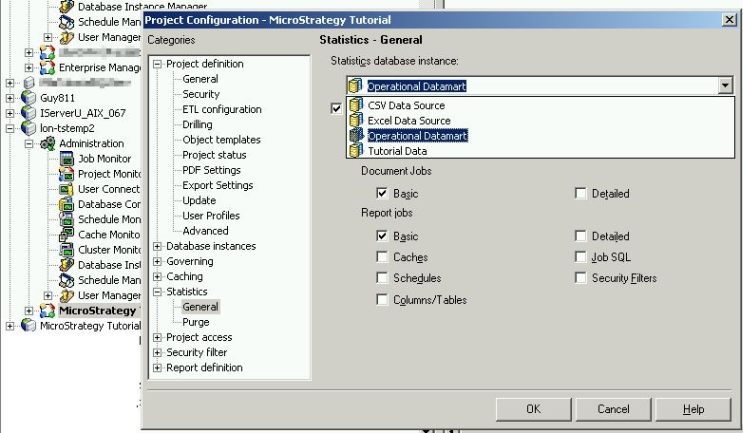
  • Open the Project Configuration for the projects involved to see what database instance is used for the statistics logging by Strategy Intelligence Server 9.x, as shown below:
ka04W000000OgxEQAS_0EM440000002BPh.jpeg
  • Go to the Database Instance Manager and check how the database instance found in the first step has been configured and if there are any mistakes or missing information on any of the tabs:
ka04W000000OgxEQAS_0EM440000002BPj.jpeg
  • Restart the Strategy Intelligence Server 9.x after changes have been applied.

WORKAROUND:
If the message continues to show despite following instructions above, the administrator can chose to create a new Strategy Intelligence Server 9.x definition in the Strategy Configuration Wizard. Be aware that this will reset the Strategy Intelligence Server 9.x configuration back to its default values, so make sure to write down any custom settings. Refer to the following Strategy Knowledge Base technical note for more information about these settings:
 
KB13546: What Project Configuration settings are lost when the user deletes and recreates a MicroStrategy Intelligence Server 8.1.x definition?


Comment

0 comments

Details

Knowledge Article

Published:

June 7, 2017

Last Updated:

June 7, 2017