EducationSoftwareStrategy.com
StrategyCommunity

Knowledge Base

Product

Community

Knowledge Base

TopicsBrowse ArticlesDeveloper Zone

Product

Download SoftwareProduct DocumentationSecurity Hub

Education

Tutorial VideosSolution GalleryEducation courses

Community

GuidelinesGrandmastersEvents
x_social-icon_white.svglinkedin_social-icon_white.svg
Strategy logoCommunity

© Strategy Inc. All Rights Reserved.

LegalTerms of UsePrivacy Policy
  1. Home
  2. Topics

KB17396: When exporting a report to Microsoft Excel, headers are displayed in two rows, one for metric headers and one for attribute headers, in MicroStrategy Developer 9.x and 10.x


Stefan Zepeda

Salesforce Solutions Architect • Strategy


KB17396: When exporting a report to Microsoft Excel, headers are displayed in two rows, one for metric headers and one for attribute headers, in MicroStrategy Developer 9.x and 10.x

SYMPTOM:
When a report is exported to Microsoft Excel from Strategy Developer 9.x and 10.x, the row headers are displayed in two rows, one for metric headers and one for attribute headers, as shown in the image below.
 
 
NOTE: Metric headers were exported to row 14 and attribute headers were exported to row 15.
 
CAUSE:
This is the default behavior for exports.
 
ACTION:
In order to change this, follow the steps below:
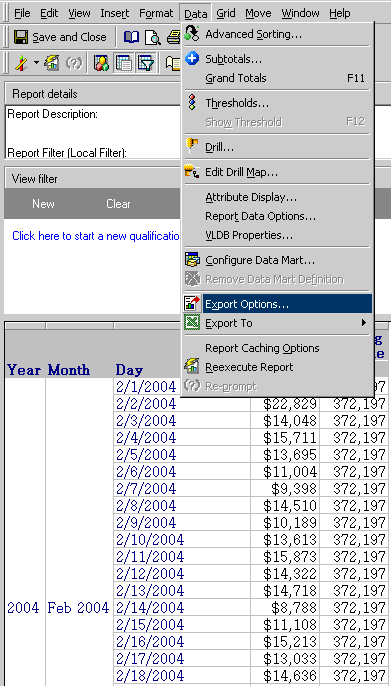
 

  • Go to Data > Export Options, as shown below:
ka02R000000kbJ3QAI_0EM440000002VAp.jpeg
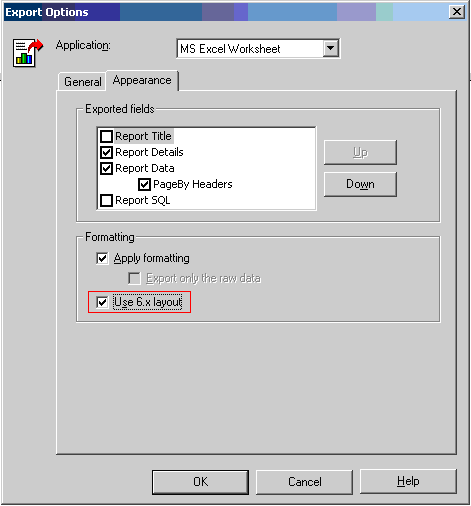
  • Go to the Appearance tab and check the 'Use 6.x layout' check box, as shown below:
ka02R000000kbJ3QAI_0EM440000002VB5.jpeg
  • Now the headers will appear in one single row (row 14 in the example below) when the document is exported to Microsoft Excel:

Comment

0 comments

Details

Knowledge Article

Published:

July 19, 2017

Last Updated:

July 19, 2017