EducationSoftwareStrategy.com
StrategyCommunity

Knowledge Base

Product

Community

Knowledge Base

TopicsBrowse ArticlesDeveloper Zone

Product

Download SoftwareProduct DocumentationSecurity Hub

Education

Tutorial VideosSolution GalleryEducation courses

Community

GuidelinesGrandmastersEvents
x_social-icon_white.svglinkedin_social-icon_white.svg
Strategy logoCommunity

© Strategy Inc. All Rights Reserved.

LegalTerms of UsePrivacy Policy
  1. Home
  2. Topics

KB17412: The MicroStrategy SQL Engine 9.4.x fails to generate SQL for a metric based on a fact defined with an ApplySimple statement


Community Admin

• Strategy


The MicroStrategy SQL Engine 9.4.x fails to generate SQL for a metric based on a fact defined with an ApplySimple statement

SYMPTOM:
SQL for a metric based on a fact defined with an ApplySimple statement is missing in the report SQL at run time in Strategy 9.4.x.
 
STEPS TO REPRODUCE:
Follow the steps below to reproduce this issue in the Strategy Tutorial project:
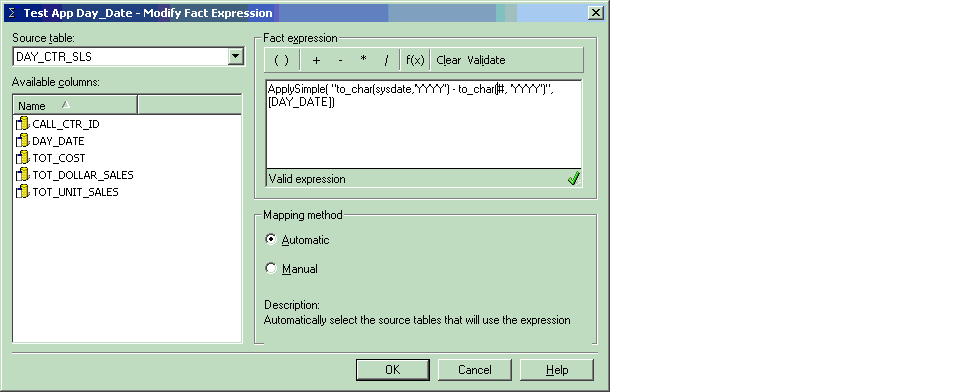
 

  • Create a new fact based on the DAY_CTR_SLS fact table with the following ApplySimple statement:
    ApplySimple("to_char(sysdate,'YYYY') - to_char(#, 'YYYY')", )
  • Click 'Validate' to validate the expression.
  • Click 'OK' to save the fact as 'Test App Day_Date' as shown below:
ka04W000000OdW5QAK_0EM440000002EzV.gif
  • Update the schema.
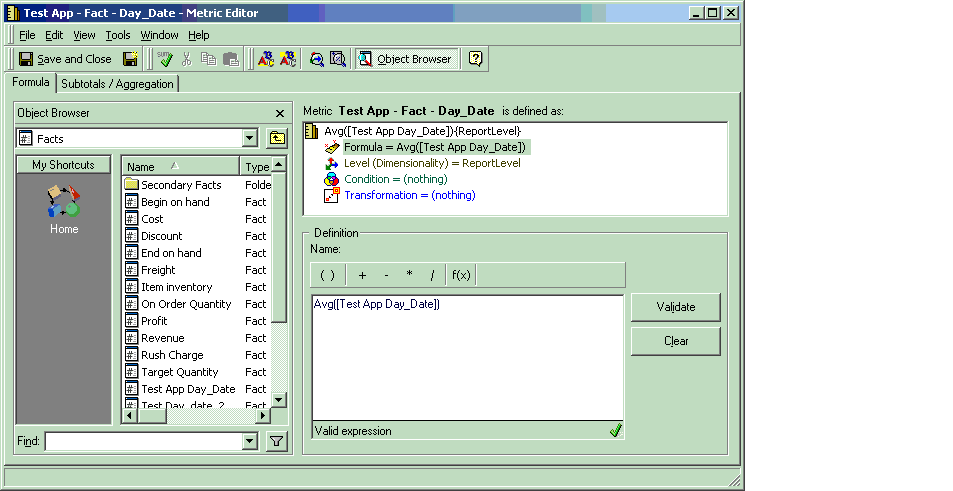
  • Create a new metric 'Test App - Fact -Day_Date' defined as:
ka04W000000OdW5QAK_0EM440000002EzF.gif
  •  
    Avg() {~}
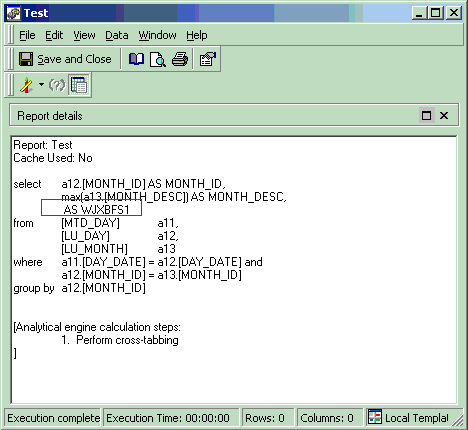
  • Create a report 'Test' with the attribute 'Month' and the metric 'Test App - Fact -Day_Date'.
  • View the report SQL and notice the SQL for the metric is missing, as shown below:
ka04W000000OdW5QAK_0EM440000002EzS.gif

CAUSE:
The ApplySimple statement in the fact expression is not using the proper placeholder.
 
ACTION:
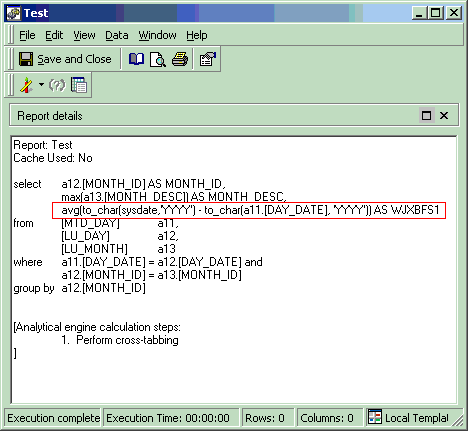
Modify the ApplySimple statement in the fact expression to include the proper placeholder as shown below:
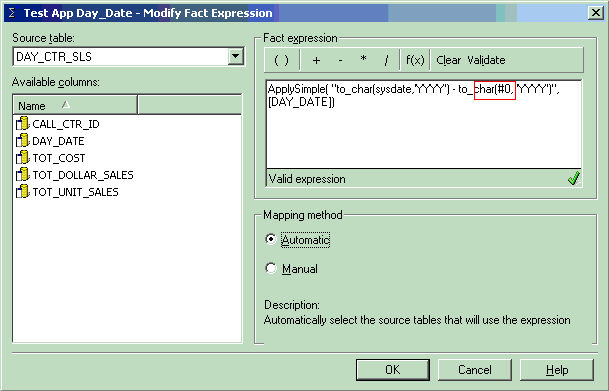
 

ka04W000000OdW5QAK_0EM440000002EzT.gif

 
ApplySimple("to_char(sysdate,'YYYY') - to_char(#0, 'YYYY')", )
The correct SQL for the metric will be generated once the schema is updated, as shown below:
 

ka04W000000OdW5QAK_0EM440000002EzQ.gif


Comment

0 comments

Details

Knowledge Article

Published:

April 13, 2017

Last Updated:

April 13, 2017