EducationSoftwareStrategy.com
StrategyCommunity

Knowledge Base

Product

Community

Knowledge Base

TopicsBrowse ArticlesDeveloper Zone

Product

Download SoftwareProduct DocumentationSecurity Hub

Education

Tutorial VideosSolution GalleryEducation courses

Community

GuidelinesGrandmastersEvents
x_social-icon_white.svglinkedin_social-icon_white.svg
Strategy logoCommunity

© Strategy Inc. All Rights Reserved.

LegalTerms of UsePrivacy Policy
  1. Home
  2. Topics

KB17428: How to run MicroStrategy Integrity Manager 10.x for reports containing specific objects


Stefan Zepeda

Salesforce Solutions Architect • Strategy


This Technical Note describes how a user would run MicroStrategy Integrity Manager 10.x for all reports containing a specific object, e.g. attribute A or metric B.

A user would like to run Strategy Integrity Manager 10.x for all reports containing a specific object, e.g. attribute A or metric B.
 
To do this, follow the steps below:
  • Create a report with the Region attribute in the Strategy Tutorial project.
  • Make a change to the Region attribute.
  • To see if that attribute modification affects any reports, the user would want use Strategy Integrity Manager 10.x to run just the reports that contain the Region attribute.
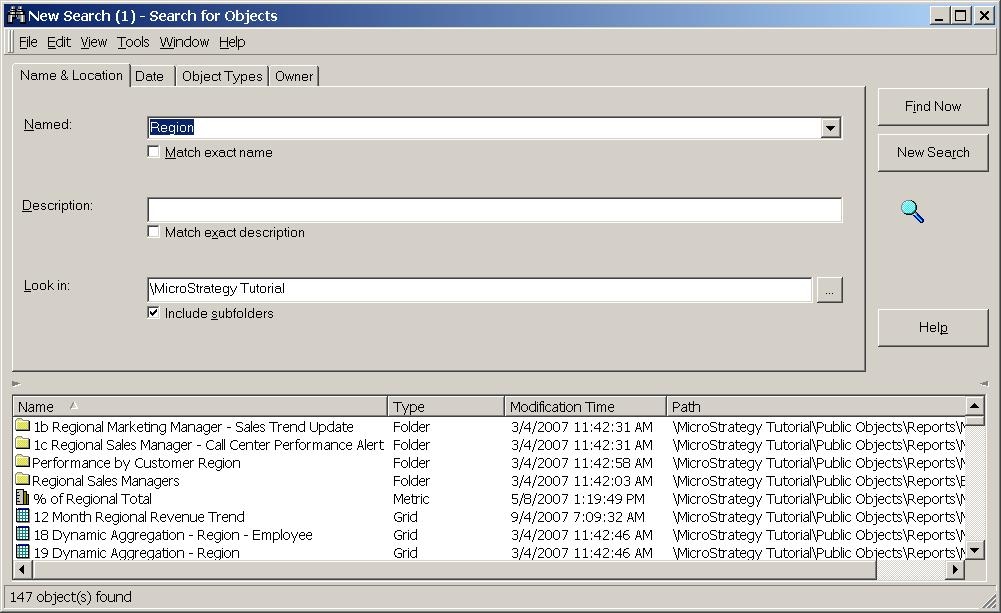
  • Create a search object within Strategy Developer 10.x that returns all the objects that are dependent on Region. Note: If objects other than reports are returned, Strategy Integrity Manager 10.x will ignore them.
    • To do this in Strategy Developer 10.x, go to Tools > 'Search for Objects'.
    • Type in Region and select 'Find Now', as shown below:
ka02R000000kcaBQAQ_0EM440000002F37.jpeg
    • Close and save the search.
  • Run the saved search object in Strategy Integrity Manager 10.x:
    • To do this, go to Programs > Strategy > Integrity Manager.
    • Select to run a test. A dialog box opens.
    • Choose 'Single Project' and select 'Next'.
    • Connect to the 3 tier Strategy Tutorial project and select 'Next'.
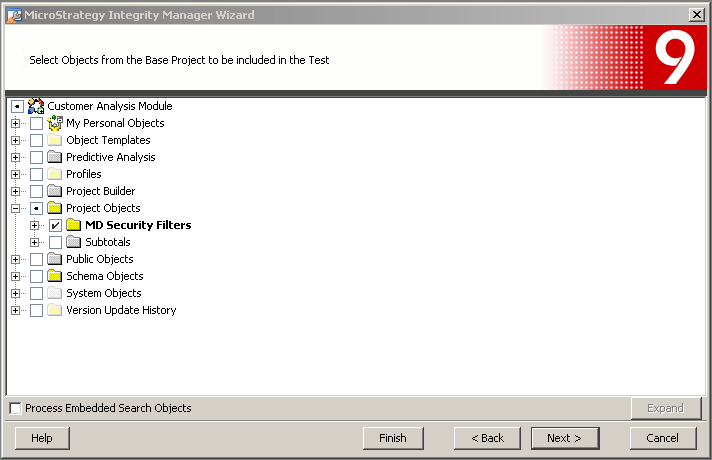
    • Select the search object from the folder browsing section and select 'Next'
ka02R000000kcaBQAQ_0EM440000002F36.png

Continue go through the prompts to tailor to view the results of the integrity test.
 
For more information on how to create a single project Integrity test, refer to the following Strategy Knowledge Base technical note:
 
KB16775 (KB5700-811-2640): How to create a single project integrity test in Strategy Integrity Manager 10.x


Comment

0 comments

Details

Knowledge Article

Published:

April 11, 2017

Last Updated:

April 11, 2017