SYMPTOM:
Users may see a large number of jobs queued up in the Job Monitor and a large number of errors in the DSSErrors log similar to the ones shown below:
Unknown failed. Unable to connect. Error type: System call error. Error communicating with connection process. Process hung..
Quiting child process because of error: Cannot execute command because there was a hang
Additionally when attempting to test the connectivity to the database using the Strategy ODBC test tool, users may intermittently see the following error:
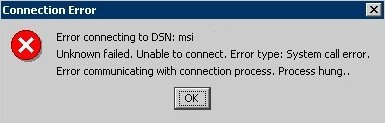
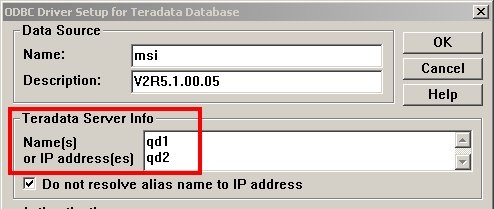
On further investigation it may be seen that the database connections that are failing are using a Teradata ODBC driver to connect to more than one Teradata host or Query Director node specified in the ODBC DSN as shown below.
CAUSE:
This issue appears to be caused by an issue related to the Teradata ODBC driver interaction with multiple teradata nodes or Query Director nodes. When the Teradata ODBC driver is issued a SQLDriverConnect call, it picks one of the hosts specified in the DSN and attempts to connect to that host. If the host does not respond in the SQL_LOGIN_TIMEOUT amount of time, the Teradata ODBC driver then attempts to connect to the host called <host>COP1, and if this fails as well, moves on to <host>COP2 and so on.
If host and <host>COP1 refer to the same IP address on the network, or more specifically, when the two hosts chosen by the ODBC driver to connect to consecutively, cannot be accessed, the Strategy database connection process does not complete the SQLDriverConnect command sent and displays the error shown above.
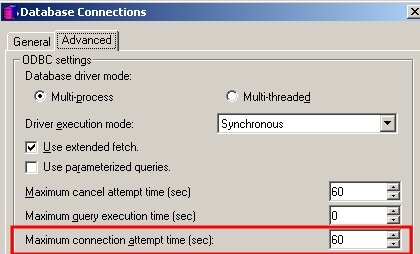
The behaviour observed above is specific to Strategy and may not be observed when using other ODBC test utilities. This is because Strategy allows users to specify a default "Maximum connection attempt time" value, which is passed to the ODBC driver as the SQL_LOGIN_TIMEOUT parameter. This parameter is unfortunately used by the Teradata ODBC driver to determine how long it should wait after attempting to connect to one node, before it attempts to fail over to the next node. As a result, only two connections can be attempted typically before the connection is assumed to have timed out by Strategy. Also, a larger value of the SQL_LOGIN_TIMEOUT results in a "hanging" like behaviour especially when using the Strategy ODBC test tool (default 5 minutes value for SQL_LOGIN_TIMEOUT).
On the Intelligence Server, this behaviour leads to jobs waiting for the connection to complete as long as the duration specified for the database connection as shown below. Once the connection attempt times out, the error may be seen in the DSSErrors log.
ACTION:
The quickest way to get jobs started again would be to start up the Teradata server or Query Director node that is affected.
The ODBC driver vendor has issued a targetted partial fix for this issue. This fix determines when Users should approach the vendor with regards to DR 125522 “ODBC Failover does not work when one of the two Query Director nodes is down”.
Strategy is evaluating a request to allow users to turn off the "Maximum connection attempt time" setting for specific database connections and allw the ODBC driver to determine whether the connection is complete or not.
Third Party Software Installation:
WARNING:
The third-party product(s) discussed in this technical note is manufactured by vendors independent of Strategy. Strategy makes no warranty, express, implied or otherwise, regarding this product, including its performance or reliability.
