SYMPTOM:
Users may notice that their DSSErrors logs are written to on Strategy Intelligence Server 10.x startup and shortly after that the logs stop being updated. Other diagnostic logging turned on for the "CastorServer Instance" also stops being appended to log files at about the same time.
On closer observation it may be seen that the logs stop being written when jobs start executing against the database.
CAUSE:
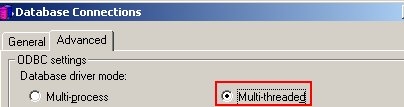
This issue has been identified as a code level issue with Strategy Intelligence Server 10.x logging architecture that is triggered when a database connection is set to use the 'Multi-threaded' database driver mode in the database connection settings as shown in the screenshot below:
ACTION:
Database connections should always use the 'Multi-process' mode for the database driver mode. Refer to the following Strategy Knowledge Base technical note for more information:
KB8932 (KB5300-7XX-0425): What is the recommended setting for the ODBC Database Driver Mode in Strategy Intelligence Server?
Setting the database connection setting back to 'Multi-process' will resolve this issue and also provide the additional robustness associated with the multi process mode of operation.
Strategy will continue to investigate and post updates as soon as they are available.
