EducationSoftwareStrategy.com
StrategyCommunity

Knowledge Base

Product

Community

Knowledge Base

TopicsBrowse ArticlesDeveloper Zone

Product

Download SoftwareProduct DocumentationSecurity Hub

Education

Tutorial VideosSolution GalleryEducation courses

Community

GuidelinesGrandmastersEvents
x_social-icon_white.svglinkedin_social-icon_white.svg
Strategy logoCommunity

© Strategy Inc. All Rights Reserved.

LegalTerms of UsePrivacy Policy
  1. Home
  2. Topics

KB17502: What settings in Report Service documents could cause blank pages to be displayed when viewed as PDF in MicroStrategy Developer and Web 2021?


Stefan Zepeda

Salesforce Solutions Architect • Strategy


This article lists the settings within Report Services documents which can cause extra blank pages in PDF exports

When executes a Report Service document and views it in PDF in Strategy Developer or Web 2021, it is noticed that there are extra blank pages inserted.
 
There are many settings within Report Services documents which can cause this behavior, and each one should be examined.
 
There are three possible areas that should be checked to confirm which one of these particular settings is causing the extra page(s):
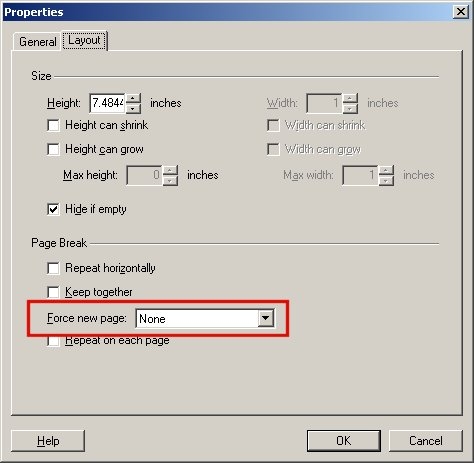
  • Click on the Format menu and select Properties. Click on the layout tab. Here the 'Force new page' setting can be set.
ka0PW0000002vJxYAI_0EM440000002F3Y.jpeg
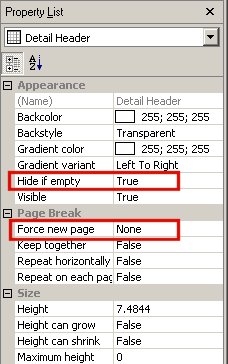
  • Each separate section will have their own properties which should be looked at:
ka0PW0000002vJxYAI_0EM440000002F3X.jpeg
  •  
    If a section is empty and the 'Hide if empty' option is set to True, that could be the cause of extra pages being inserted. Force new page will be evaluated at the page break.
     
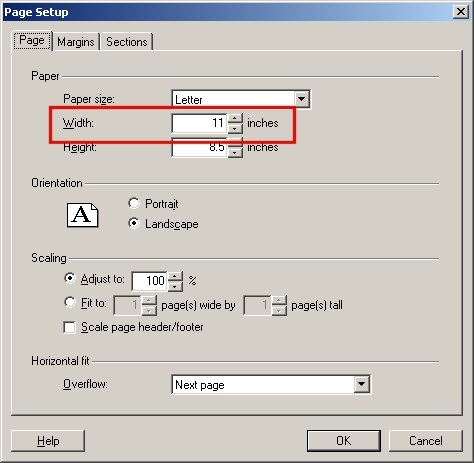
  • A page's width may be set to a number higher than the width specified in the page layout dialog box below:
ka0PW0000002vJxYAI_0EM440000002F3Z.jpeg
  •  
    Using the example above, any space beyond 8.5 inches will flow over to the next page. In most cases this is unused space which can simply be removed.

    The same options are available in Strategy Workstation 2021.

Comment

0 comments

Details

Knowledge Article

Published:

April 20, 2017

Last Updated:

August 9, 2024