EducationSoftwareStrategy.com
StrategyCommunity

Knowledge Base

Product

Community

Knowledge Base

TopicsBrowse ArticlesDeveloper Zone

Product

Download SoftwareProduct DocumentationSecurity Hub

Education

Tutorial VideosSolution GalleryEducation courses

Community

GuidelinesGrandmastersEvents
x_social-icon_white.svglinkedin_social-icon_white.svg
Strategy logoCommunity

© Strategy Inc. All Rights Reserved.

LegalTerms of UsePrivacy Policy
  1. Home
  2. Topics

KB17511: Network path and absolute path referred images are not displayed in MicroStrategy Web 9.x when viewed in Flash view mode inside a Report Services document


Community Admin

• Strategy


This article discusses a behaviour in MicroStrategy Web 9.x whereby images embedded in Reporting Services Documents viewed in Flash View Mode will not be displayed if they are referenced through network or an absolute path.

SYMPTOM
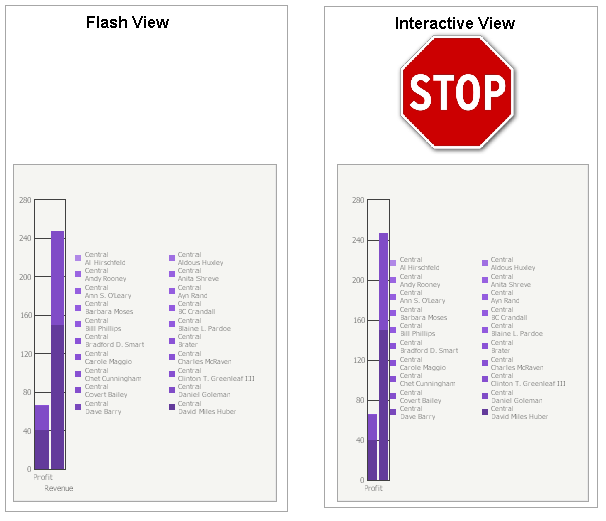
When a user displays a Report Services document in Flash view mode from Strategy Web 9.x, an empty space is displayed where an image should be.
 
The images are displayed correctly when viewed in Interactive mode, as shown in the following image:
ka04W000000OgWmQAK_0EM4400000028fp.jpeg

CAUSE
Currently, Flash does not support network path (\\machine-name\folder\image.jpg) and local path (C:\My images\image.jpg) as image sources.
 
ACTION
In order to display the image correctly in Flash, the image needs to be referred using one of the following methods:

  • On the Network: http://WebSite.com/Image.jpg
  • Relative to HTML Document directory: images\Image.jpg

Comment

0 comments

Details

Knowledge Article

Published:

June 16, 2017

Last Updated:

June 16, 2017