EducationSoftwareStrategy.com
StrategyCommunity

Knowledge Base

Product

Community

Knowledge Base

TopicsBrowse ArticlesDeveloper Zone

Product

Download SoftwareProduct DocumentationSecurity Hub

Education

Tutorial VideosSolution GalleryEducation courses

Community

GuidelinesGrandmastersEvents
x_social-icon_white.svglinkedin_social-icon_white.svg
Strategy logoCommunity

© Strategy Inc. All Rights Reserved.

LegalTerms of UsePrivacy Policy
  1. Home
  2. Topics

KB17514: Using the 'Preserve all final pass result elements' VLDB property at attribute level in MicroStrategy SQL Generation Engine


Community Admin

• Strategy


This article explains how the preserve all final pass result elements property works at the attribute level in MicroStrategy

In Strategy SQL Generation Engine, the VLDB property "Preserve all final pass result elements" is designed for the case in which data elements exist in a fact table that are missing from an attribute's lookup table. (The original name for this property, in fact, was "Incomplete lookup table.") In SQL, this is handled by performing a left outer join from the metric result table to each attribute lookup table in turn.
With this property, it is possible to identify specific attributes as having an incomplete lookup table by setting the "Preserve all final pass result elements" VLDB property within the attribute. With VLDB properties correctly configured, a report can join to some lookup tables using outer join and others using inner join.
To do this, the "Preserve all final pass result elements" VLDB property must be set at both attribute and report level.

  • Attribute level: Select the desired join behavior for this attribute.
    • Inner join = Preserve common elements of final pass result table and lookup/relationship table
    • Outer join for all tables used to join to this attribute = Preserve all final pass result elements
    • Outer join for this attribute's lookup table, inner join for relationship tables between the fact and lookup tables = Preserve all elements of final pass result table with respect to lookup table but not relationship table
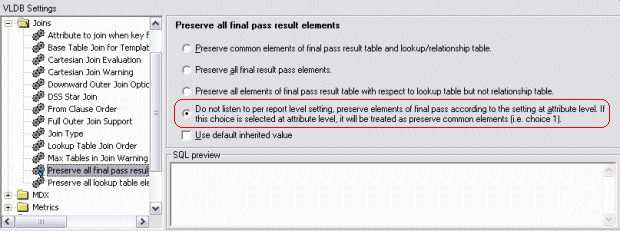
  • Report level: Must use the fourth option, "Do not listen to per report level setting, preserve elements of final pass according to the setting at attribute level." At report level, the fourth option respects the attribute-level settings. Using one of the first three options at report level will always override attribute-level settings. Therefore, if separate inner or outer joins are required depending on the attribute, "Do not listen..." must be chosen for the report. (This setting may also be made in the VLDB properties for the project's warehouse database instance, in which case it will apply to all reports using the default inherited value.)

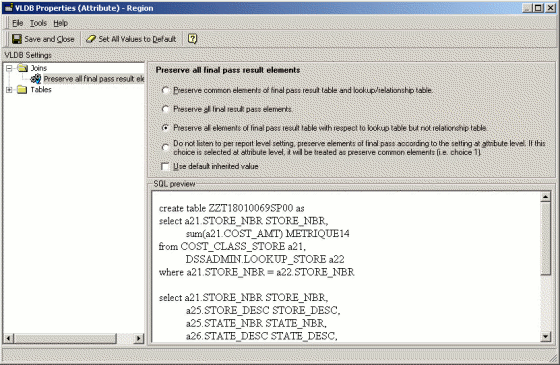
Attribute-level VLDB properties are available from the Tools menu in the attribute editor. Here, the property is set for the Region attribute.
ka04W000001MKovQAG_0EM440000002F3a.gif

The following report uses the Quarter and Region attributes. The Region attribute is set to preserve final pass result elements with respect to lookup table but not relationship table, while the Quarter attribute retains the default setting to preserve only the common elements. With the report-level VLDB property set to the fourth option, SQL generates as shown below. Note that there is only one left outer join, to LU_REGION. LU_QUARTER uses an inner join per the attribute-level setting.
Report-level setting for "Preserve all final pass result elements"
ka04W000001MKovQAG_0EM440000002F3j.gif

Report template

ka04W000001MKovQAG_0EM440000002F3c.gif

Report SQL


select a12.QUARTER_ID QUARTER_ID,

   max(a14.QUARTER_DESC) QUARTER_DESC,

   a13.REGION_ID REGION_ID,

   max(a15.REGION_NAME) REGION_NAME,

   sum(a11.TOT_DOLLAR_SALES) Revenue

from DAY_CTR_SLS a11

   join LU_DAY a12

      on (a11.DAY_DATE = a12.DAY_DATE)

   join LU_CALL_CTR a13

      on (a11.CALL_CTR_ID = a13.CALL_CTR_ID)

   join LU_QUARTER a14

      on (a12.QUARTER_ID = a14.QUARTER_ID)

   left outer join LU_REGION a15

      on (a13.REGION_ID = a15.REGION_ID)

group by a12.QUARTER_ID,

   a13.REGION_ID

Note that the setting is per attribute, not per attribute usage on a template. An attribute has only one lookup table, and this lookup table is either complete or incomplete with respect to the fact data in the warehouse as a whole. Thus the attribute-level setting applies to all reports using the attribute, provided the report sets the fourth option as discussed above. Any individual report can suppress attribute-level outer joins by setting the report level property to preserve only common elements.
 
Note: The "Preserve all final pass result elements" VLDB property is intended to place metric results on the left-hand side of a left outer join (as the driving table), and attribute lookup/relationship tables on the right (deficient tables). This setting does not create outer joins between attributes in reports that have no metrics.


Comment

0 comments

Details

Knowledge Article

Published:

April 6, 2017

Last Updated:

April 6, 2017