EducationSoftwareStrategy.com
StrategyCommunity

Knowledge Base

Product

Community

Knowledge Base

TopicsBrowse ArticlesDeveloper Zone

Product

Download SoftwareProduct DocumentationSecurity Hub

Education

Tutorial VideosSolution GalleryEducation courses

Community

GuidelinesGrandmastersEvents
x_social-icon_white.svglinkedin_social-icon_white.svg
Strategy logoCommunity

© Strategy Inc. All Rights Reserved.

LegalTerms of UsePrivacy Policy
  1. Home
  2. Topics

KB17520: Numerical Values are changed to date formats when exporting a report to Microsoft Excel in MicroStrategy Web


Community Admin

• Strategy


Numerical Values are changed to date formats when exporting a report to Microsoft Excel in MicroStrategy Web.

SYMPTOM:
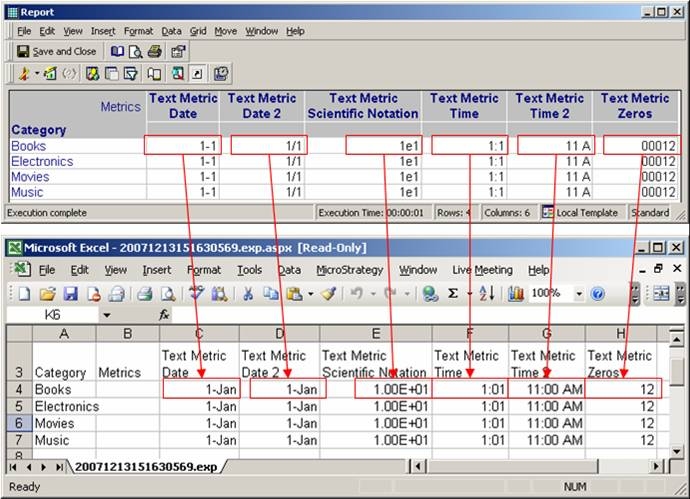
When exporting a report in Strategy Web 8.1.x to Microsoft Excel with plain text, the values of some metrics is changed. This issue only occurs when exporting with plain text; if exporting with formatting this issue is not seen.
 
The image below shows the report execution in Strategy Desktop 8.1.x and the results of exporting to Microsoft Excel in plain text. The data values are changed in the Microsoft Excel file.
 

ka04W00000148riQAA_0EM4400000028Xq.jpeg

 
CAUSE:
The cause of this issue is that Microsoft Excel tries to format the data that Strategy sends. Since Strategy sends the data as plain text, Microsoft Excel recognizes the data as a pattern of dates, times, or numbers and formats that data accordingly. This issue is not seen when exporting with formatting since Strategy sends the formatting information to Microsoft Excel, so Microsoft Excel does not need to determine the formatting on its own.
 
The following Microsoft article explains this Microsoft Excel feature:
 
http://support.microsoft.com/kb/214233
 
WORKAROUND:
There are three possible workarounds for this issue if the user does not want to export with formatting:
 

  1. Place a space in the beginning of each entry. This has to be done by either changing the metric definition to append a space at the beginning of each value or in the warehouse itself.
  2. Manually change the formatting in Microsoft Excel by selecting the cells and changing it in the format menu.
  3. Precede the data with an apostrophe. This can also be done at the definition of the metric or in the warehouse itself.

Comment

0 comments

Details

Knowledge Article

Published:

July 16, 2017

Last Updated:

June 17, 2020