EducationSoftwareStrategy.com
StrategyCommunity

Knowledge Base

Product

Community

Knowledge Base

TopicsBrowse ArticlesDeveloper Zone

Product

Download SoftwareProduct DocumentationSecurity Hub

Education

Tutorial VideosSolution GalleryEducation courses

Community

GuidelinesGrandmastersEvents
x_social-icon_white.svglinkedin_social-icon_white.svg
Strategy logoCommunity

© Strategy Inc. All Rights Reserved.

LegalTerms of UsePrivacy Policy
  1. Home
  2. Topics

KB17532: 'No data returned for this view. This might be because the applied filter excludes all data' or 'Error in document results. Error when answering the prompt. Please review your answer(s)' error appears when using a time slider in MicroStrategy Web


Community Admin

• Strategy


'No data returned for this view. This might be because the applied filter excludes all data' or 'Error in document results. Error when answering the prompt. Please review your answer(s)' error appears when using a time slider in MicroStrategy Web 9.x

SYMPTOM:
When running a document using a time slider in Strategy Web 9.x, users receive the following error in Flash mode:
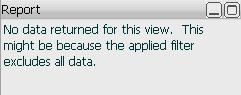
 

ka04W000000OdipQAC_0EM4400000028f7.jpeg

 
"No data returned for this view. This might be because the applied filter excludes all data."
Or the following error in Interactive mode:

 

ka04W000000OdipQAC_0EM4400000028f9.jpeg

 
Error in document results
Error when answering the prompt. Please review your answer(s).
STEPS TO REPRODUCE:
Follow the steps below to reproduce the issue in the Strategy Tutorial project against a SQL Server warehouse:
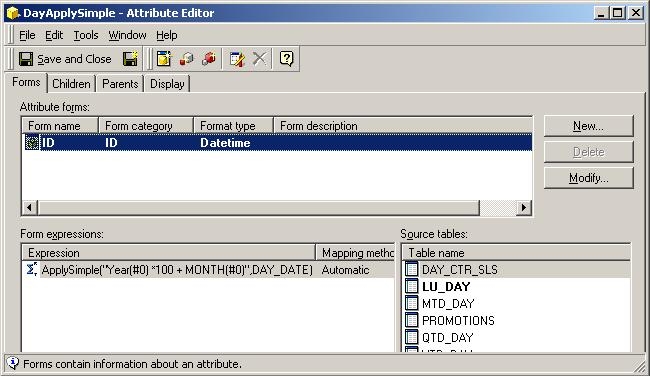
 

  • Create an attribute using the LU_DAY table and the DAY_DATE column with the following definition as the ID form:
    ApplySimple("Year(#0)*100 + Month(#0)",)
  • Set the Format Type to be 'Datetime', as shown below:
     
ka04W000000OdipQAC_0EM4400000028f6.jpeg
  • Update schema, and create a report using this new attribute on the grid.
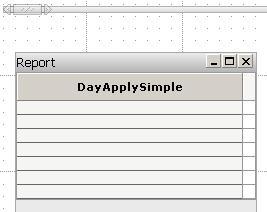
  • In Strategy Web 9.x, create a dashboard with this report as the source. Drag over the grid, and add a time slider above the grid, as shown below:
ka04W000000OdipQAC_0EM4400000028fF.jpeg
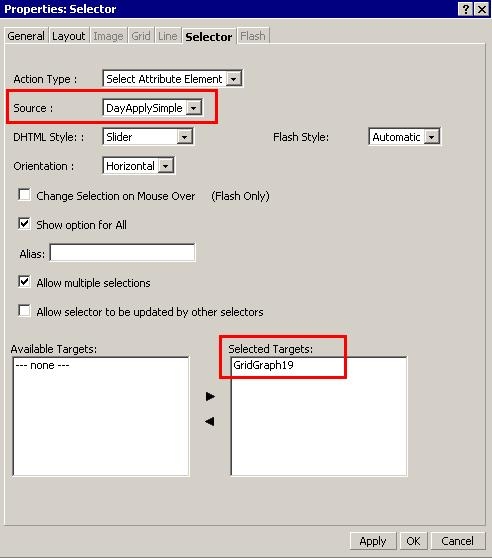
  • Right click on the time slider and choose 'properties'. Change to the 'selector' tab, and drop down the 'Source' box to the attribute created in step 1.
  • Still in the 'Selector' tab, move the grid from step 3 from the left to right hand side as a 'Selected target', as shown below:
ka04W000000OdipQAC_0EM4400000028fN.jpeg
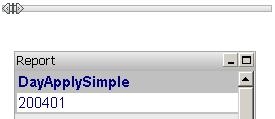
  • Save the document, and run it into Interactive mode. In interactive mode, data initially returns and the selector appears to have functioned properly:, as shown below:
ka04W000000OdipQAC_0EM4400000028f5.jpeg
  •  
    However, upon moving the slider, an error message is thrown, as shown below:
     
ka04W000000OdipQAC_0EM4400000028f9.jpeg
  •  
    When switching to Flash mode, no data returns at all, as shown below:
     
ka04W000000OdipQAC_0EM4400000028f7.jpeg

CAUSE:
This issue is caused by a type mismatch between the attribute's warehouse data and the format type chosen for the attribute. In the above example, the warehouse data (after the apply-simple) came out looking like a numeric format "200401". While the attribute's format type was expecting a date-time format.
 
ACTION:
Ensure that there is no type mismatch between objects serving as a selector source. In the above example, the current attribute format of datetime is invalid. Changing the attribute's format type to a correct value of either Date or Numeric resolves this issue.


Comment

0 comments

Details

Knowledge Article

Published:

June 20, 2017

Last Updated:

June 20, 2017