EducationSoftwareStrategy.com
StrategyCommunity

Knowledge Base

Product

Community

Knowledge Base

TopicsBrowse ArticlesDeveloper Zone

Product

Download SoftwareProduct DocumentationSecurity Hub

Education

Tutorial VideosSolution GalleryEducation courses

Community

GuidelinesGrandmastersEvents
x_social-icon_white.svglinkedin_social-icon_white.svg
Strategy logoCommunity

© Strategy Inc. All Rights Reserved.

LegalTerms of UsePrivacy Policy
  1. Home
  2. Topics

KB17543: After updating the password for the MicroStrategy Narrowcast Server 9.x - 10.x Windows services, the system cannot be started through the MicroStrategy Narrowcast Server Administrator


Community Admin

• Strategy


After changing the password for the Windows NT user account that the MicroStrategy Narrowcast Server 9.x - 10.x services are setup to log on as, the MicroStrategy Narrowcast Server will not be able to start.  However, after correctly updating the password for the MicroStrategy Narrowcast Server 9.x - 10.x services the system still cannot be started via the MicroStrategy Narrowcast Server 9.x - 10.x Administrator.

SYMPTOM:
After changing the password for the Windows NT user account that the Strategy Narrowcast Server 9.x - 10.x services are setup to log on as, the Strategy Narrowcast Server will not be able to start. 
 
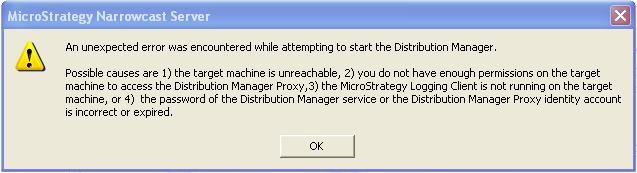
However, after correctly updating the password for the Strategy Narrowcast Server 9.x - 10.x services the system still cannot be started via the Strategy Narrowcast Server 9.x - 10.x Administrator:
ka04W000000OhWhQAK_0EM440000002BMz.jpeg


An unexpected error was encountered while attempting to start the Distribution Manager.

Possible causes are 1) the target machine is unreachable, 2) you do not have enough permission on the target machine to access the Distributor Manager Proxy, 3) the Strategy Logging Client is not running on the target machine, or 4) the password of the Distribution Manager Service or the Distribution Manager Proxy identity account is incorrect or expired.
 
If either the Strategy Distribution Manager or Strategy Execution Engine services is started through the Windows Services manager, it starts up successfully without any errors.
 
CAUSE:
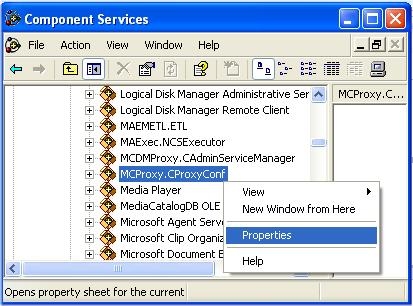
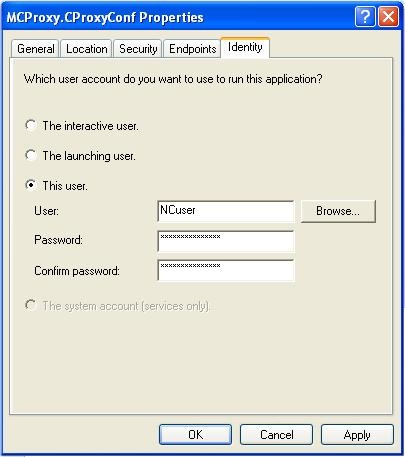
The MCProxy.CProxyConf and / or MCDMProxy.CAdminServiceManager component service Identity is set to explicitly run as the Windows NT user whose password was changed. This is part of the Windows DCOM setup and is not automatically updated when a Windows user changes his or her password, unless the Identity is set to 'The launching user'.
 
ACTION:
Follow the steps below to resolve this issue:

  • Access the DCOM properties for the components MCDMProxy.CAdminServiceManager and MCProxy.CproxyConf.
ka04W000000OhWhQAK_0EM440000002BN0.jpeg
  • Access the identity tab and update the password for the user account or modify the selection to 'The launching user' so that the password does not have to be manually updated each time the windows account password is changed.
ka04W000000OhWhQAK_0EM440000002BMx.jpeg

Refer to the following Strategy Knowledge Base technical note for explicit steps on setting DCOM on Microsoft Windows 2003 Server machines:
KB10646: How to set the DCOM settings for remote administration of MicroStrategy Narrowcast Server on a Windows 2003 Server machine


Comment

0 comments

Details

Knowledge Article

Published:

May 16, 2017

Last Updated:

May 16, 2017