SYMPTOM:
A user may want to create an attribute with an alternating expression depending on a certain condition, a conditional attribute. This condition may be implemented through an ApplySimple statement such as the following:
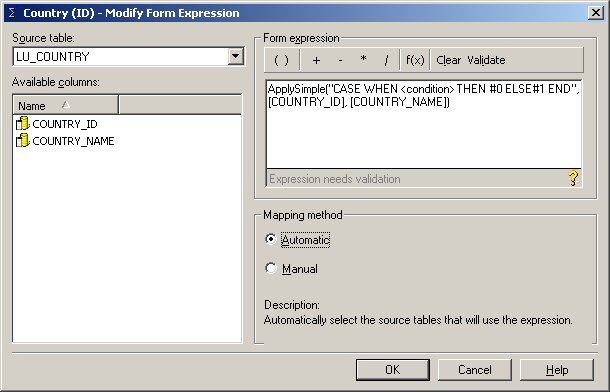
The user will find that the CASE statement works correctly alternating the column used, but the data is wrong or incomplete.
CAUSE:
Both manual and automatic mapping methods will display the tables containing the two columns used in the THEN statement of the condition and will filter out those tables containing only one of the two columns.
ACTION:
To solve this, users will have to map those tables containing only one of the columns to the attribute to get the correct results. Achieve this using Heterogeneous Mapping, described in the following Strategy Knowledge Base technical note:
KB4618 (KB4100-007-0046): How to create an attribute in Strategy Architect 7.x that can join on columns from different tables with different names (heterogeneous column joining)
NOTE: The use of heterogeneous mapping on its own will solve the issue but will cause that the attributes from the CASE statement, when used alone in a report, will bring the ApplySimple statement to the report's query even when the conditional attribute is not present in the report and the execution will fail. The ApplySimple statement will appear as part of the error message.
To solve this, refer to the following Strategy Knowledge Base technical note to understand what attribute roles are and how to use them to solve this issue:
KB6197 (KB5800-072-0108): How do Attribute Roles Work in Strategy 8.x?
Heterogeneous mapping and attribute roles will not be discussed in this technical note.
