Strategy Knowledge Base technical note KB5600-810-2708 describes how to use the Firebug plugin for Firefox to retrieve data and definition XML. In cases where Firefox and Firebug cannot be used, there is a freely available tool, Fiddler (available at http://www.fiddlertool.com/fiddler/version.asp), which can retrieve the same information.
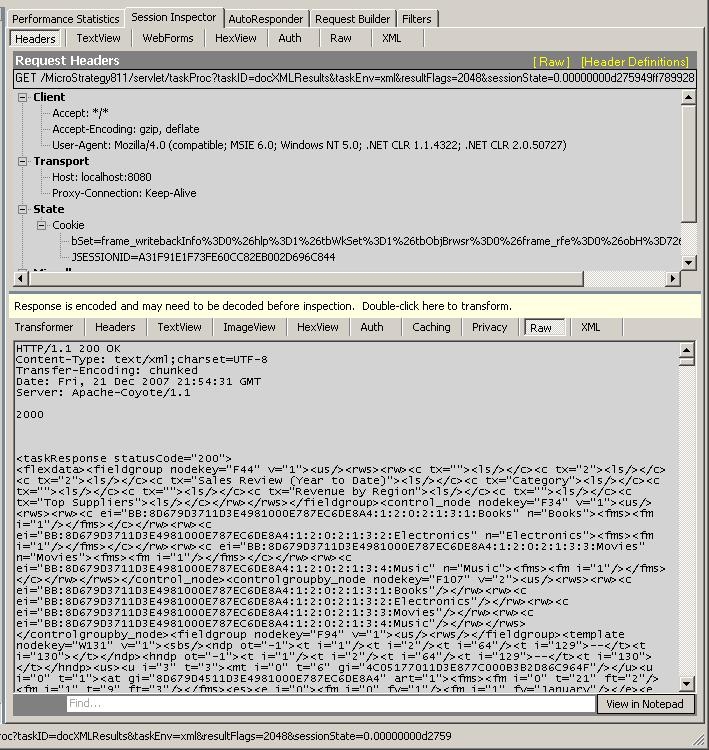
Once installed and running, Fiddler monitors http traffic, and can retrieve the XML sent to the dashboard viewer. To get the XML, select the request that retrieves it (it will be a long URL containing "taskID=docXMLResults").
Once selected, choose the "Session Inspector" Tab of Fiddler, then select "Raw" in the lower half of Fiddler's interface.
Third Party Software Installation:
WARNING:
The third-party product(s) discussed in this technical note is manufactured by vendors independent of Strategy. Strategy makes no warranty, express, implied or otherwise, regarding this product, including its performance or reliability.
