SYMPTOM:
Considering the way custom groups are currently resolved in datamart reports, there could be a potential bottleneck at the point of inserting data into the datamart table depending on its size.
It is possible to improve performance by enabling 'parameterized queries.'
CAUSE:
Without 'parameterized queries' enabled, the insert happens row by row and that operation takes time - the database puts lock on the table, writes a row, unlocks … Parameterized query will allow 'bulk copy' which will speed up insertion by writing bigger chunks of data.
ACTION:
To enable 'parameterized queries', the following needs to be done in Strategy Developer:
Under the Administration tab, go to Database Instance Manager, right click on the Database Instance and edit > Modify > Database Connection > Advanced Options, as shown below;
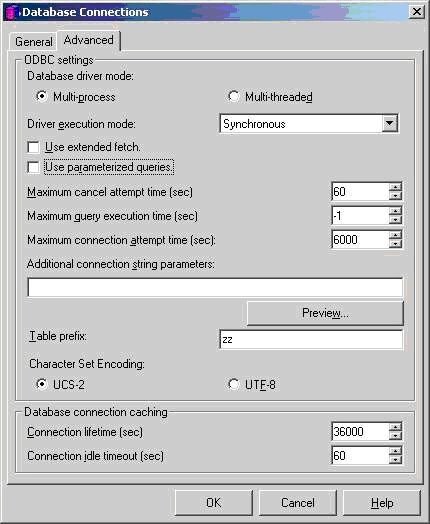
If the setting 'Use parameterized queries' is disabled, the SQL view of the simple custom group data mart report looks like:
SQL Statements
Pass0 - Duration: 0:00:00.04
select sum(a11.TOT_DOLLAR_SALES) Revenue
from CUSTOMER_SLS a11
join LU_CUSTOMER a12
on (a11.CUSTOMER_ID = a12.CUSTOMER_ID)
where (DATEPART(YEAR, GETDATE()) - DATEPART(YEAR, a12.CUST_BIRTHDATE)) < 25
Pass1 - Duration: 0:00:00.04
select sum(a11.TOT_DOLLAR_SALES) Revenue
from CUSTOMER_SLS a11
join LU_CUSTOMER a12
on (a11.CUSTOMER_ID = a12.CUSTOMER_ID)
where (DATEPART(YEAR, GETDATE()) - DATEPART(YEAR, a12.CUST_BIRTHDATE)) between 25 and 35
...
Pass7 - Duration: 0:00:00.03
create table #ddd(
ELM_ID VARCHAR(254),
ELM_NAME VARCHAR(254),
F_ID INTEGER,
F_NAME VARCHAR(254),
Revenue FLOAT)
Pass8 - Duration: 0:00:00.00
insert into #ddd values (null, null, 2, `< 25`, 1640247)
Notice the insert in Pass 8
Pass8 - Duration: 0:00:00.00
insert into #ddd values (null, null, 2, `< 25`, 1640247)
By enabling the setting "Use parameterized queries" Pass 8 will look like:
Pass8 - Duration: 0:00:00.00
insert into #ddd values (?, ?, ?, ?, ?)
