EducationSoftwareStrategy.com
StrategyCommunity

Knowledge Base

Product

Community

Knowledge Base

TopicsBrowse ArticlesDeveloper Zone

Product

Download SoftwareProduct DocumentationSecurity Hub

Education

Tutorial VideosSolution GalleryEducation courses

Community

GuidelinesGrandmastersEvents
x_social-icon_white.svglinkedin_social-icon_white.svg
Strategy logoCommunity

© Strategy Inc. All Rights Reserved.

LegalTerms of UsePrivacy Policy
  1. Home
  2. Topics

KB17678: How to hide rows where all metric values are nulls in MicroStrategy Developer 10.x


Stefan Zepeda

Salesforce Solutions Architect • Strategy


KB17678: How to hide rows where all metric values are nulls in MicroStrategy Developer 10.x

SYMPTOM:
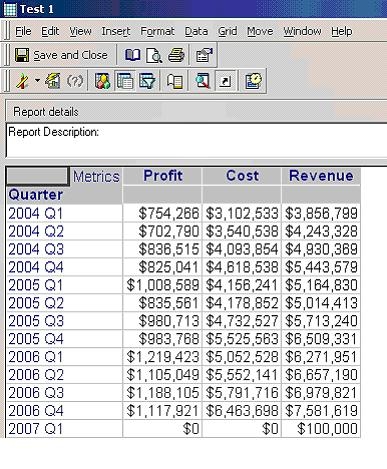
A user has created a report that has three metrics in Strategy Developer 10.x as shown below:
 
 
Data should have at least one row that has all null values and at least one row where only one metric has a value. The rows where all data is null still shows because of the outer joins. If the outer joins are removed the row that has data only on one metric will be removed
 
ACTION:
In order not to show the rows where all the metric values are nulls, follow the steps below:
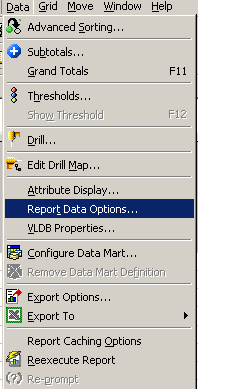
 

  • Go to Report Data Options, as shown below:
ka02R000000kbJ9QAI_0EM440000002VAx.jpeg
  • Select metric join types and make sure that they are set to outer joins, as shown below:
  • Then go to attribute join types and make sure it is set to Default, as shown below:
  • Run the report and the results will display as follows:
ka02R000000kbJ9QAI_0EM440000002VAq.jpeg

Comment

0 comments

Details

Knowledge Article

Published:

July 19, 2017

Last Updated:

July 19, 2017