SYMPTOM
A user creates a report with attribute qualification in the report filter. Attribute outer joins are specified, using either the Report Data Options > Attribute Join Type or VLDB Properties > 'Preserve all lookup table elements' settings.
However, the report result contains rows for attribute elements not included in the filter, and the metric(s) have null values for those rows.
In the following sample report, the report filter excludes all but four quarters. However, the result displays every quarter in the lookup table:
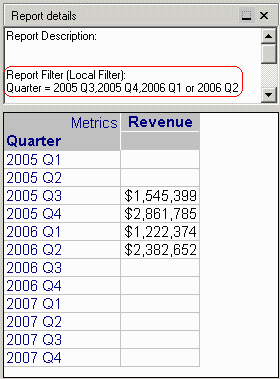
In the report SQL, it may be observed that the Quarter filter is used when calculating the Revenue metric, but it is left out of the final pass.
select a11.QUARTER_ID QUARTER_ID,
sum(a11.TOT_DOLLAR_SALES) WJXBFS1
into #ZZTS00200JAOL000
from QTR_CATEGORY_SLS a11
where a11.QUARTER_ID in (20053, 20054, 20061, 20062)
group by a11.QUARTER_ID
select a11.QUARTER_ID QUARTER_ID,
a11.QUARTER_DESC QUARTER_DESC,
pa12.WJXBFS1 WJXBFS1
from LU_QUARTER a11
left outer join #ZZTS00200JAOL000 pa12
on (a11.QUARTER_ID = pa12.QUARTER_ID)
where a11.QUARTER_ID in (20053, 20054, 20061, 20062)
CAUSE
The 'Preserve all lookup table elements' VLDB property can be configured to consider report filter qualifications that are related to attributes to be outer joined, or to ignore those qualifications. This choice is left to the user, because one or the other behavior may be desired in different circumstances.
The third and fourth options of this VLDB property are the most commonly used for outer joins.
If the above report selected 'Preserve lookup table elements... without filter' as its attribute outer join option, then the behavior is by design.
ACTION
Change the VLDB property to use the 'Preserve lookup table elements... with filter' option. With the modified setting, the example report produces the following result:

