EducationSoftwareStrategy.com
StrategyCommunity

Knowledge Base

Product

Community

Knowledge Base

TopicsBrowse ArticlesDeveloper Zone

Product

Download SoftwareProduct DocumentationSecurity Hub

Education

Tutorial VideosSolution GalleryEducation courses

Community

GuidelinesGrandmastersEvents
x_social-icon_white.svglinkedin_social-icon_white.svg
Strategy logoCommunity

© Strategy Inc. All Rights Reserved.

LegalTerms of UsePrivacy Policy
  1. Home
  2. Topics

KB17738: When an attribute ID is text, a report returns an error because the filter does not use single quote for values in MicroStrategy Developer 9.x


Stefan Zepeda

Salesforce Solutions Architect • Strategy


When an attribute ID is text, a report returns an error because the filter does not use single quote for values in MicroStrategy Developer 9.x

SYMPTOM:
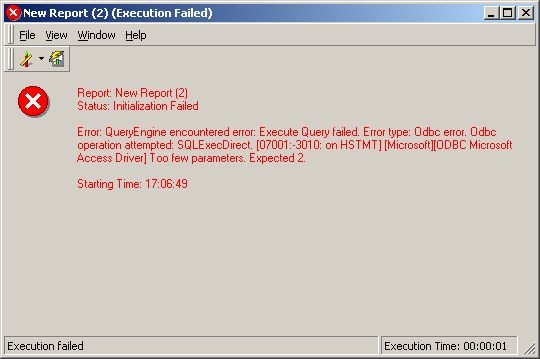
When running a report with a filter defined with an attribute using text as an ID, it returns an error in Strategy Developer 9.x, as illustrated below:
 

ka02R000000kXZGQA2_0EM440000002EyA.jpeg

 
Too few parameters. Expected 2.
Note: Error message can be different from database type.
 
CAUSE:
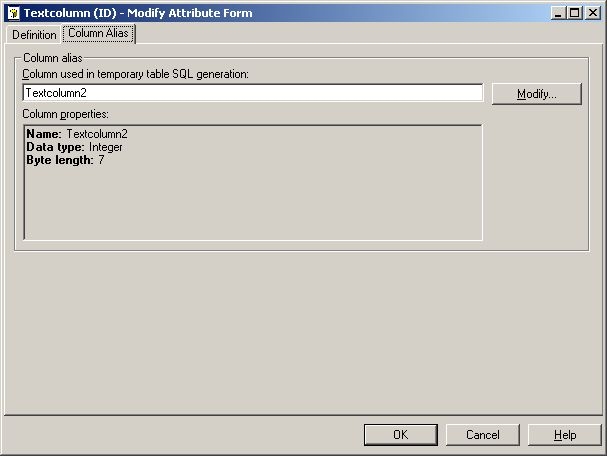
The attribute ID form 'Format' is set to 'Text'. However, the column alias data type is set to 'Integer', as shown below:
 

ka02R000000kXZGQA2_0EM440000002EyF.jpeg

 
ACTION:
Change the column alias data type to 'VarChar' or proper text format.


Comment

0 comments

Details

Knowledge Article

Published:

June 14, 2017

Last Updated:

June 14, 2017